Copy Checklist From Taskpaper

New shortcut Copy Checklist from Taskpaper for iOS 13 beta users:

Takes any TaskPaper-formatted text coming from the share sheet or clipboard and strips out the extra details, getting just the names of the checklist items in a rich text unordered list.
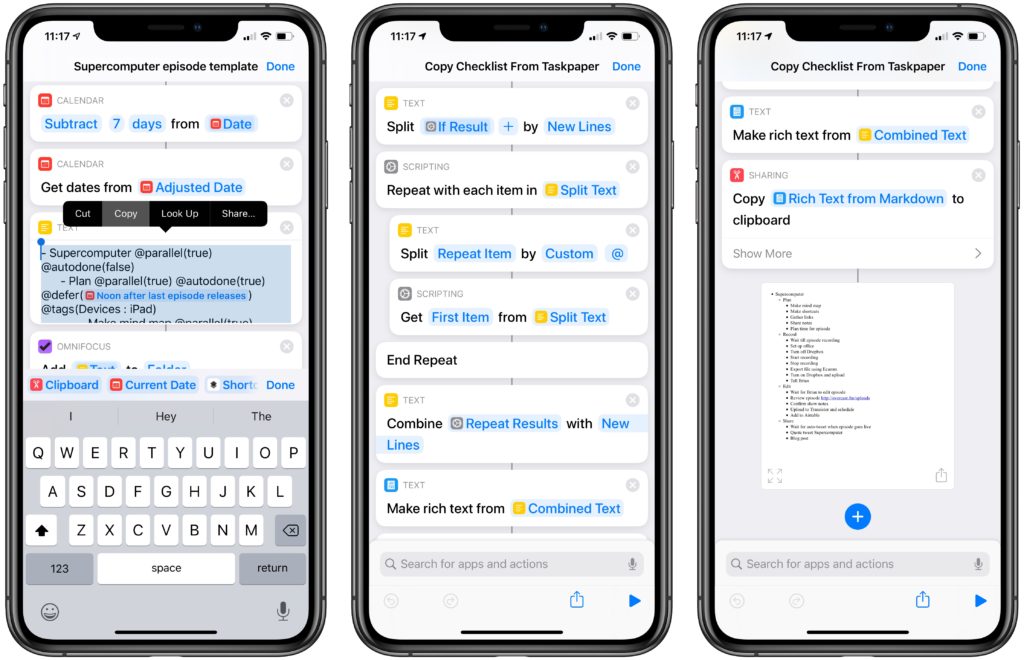
Three screenshots from the Shortcuts app, showing user copying a TaskPaper list out of one, running it through the linked shortcut, and showing a final result of a Markdown-formatted checklist.

Built this for myself today, after I found an OmniFocus template I had created in the past that I wanted to put it into Things instead.

It had a bunch of TaskPaper cruft I’d have to manually delete – now, I can run the template through this and end up with a nice checklist.
Get the shortcut or view a screenshot of the full shortcut.

Posts You Might Like

Look ahead at your day with “Agenda”
Learn how to build your own Siri-based Shortcuts – starting with a look ahead at your schedule for the day.
What’s new in Shortcuts for iOS 18.1, iPadOS 18.1, macOS 15.1, watchOS 11.1 and visionOS 2.1 »
Apple has updated the release notes for Shortcuts with all the new actions available in iOS 18.1.
Apple adds new App Intents APIs for Shortcuts in iOS 16.4 betas
In the iOS 16.4 beta, Apple has added a new protocol for App Intents developers—ForegroundContinuableIntent—which engineering manager Michael Gorbach linked to on Mastodon.
Check out Apple “Shortcuts for Developers” Page
From the Apple Developer website – a starting point for developers looking to understand Shortcuts and get started with App Intents.