File a radar

Guides you through the process of filing Feedback to Apple (previously called Radar). This explains the process in a pop-up, has you type up the problem through a series of prompts before even starting a new ticket, then guides you again on how to easily fill out the form, before finally opening into Feedback.

New shortcut File a radar for iOS 13 beta users:

Guides you through the process of filing Feedback to Apple (previously called Radar).

This explains the process in a pop-up, has you type up the problem through a series of prompts before even starting a new ticket, then guides you again on how to easily fill out the form, before finally opening into Feedback.

I built this shortcut to make it easier on myself to submit bugs to Apple – I found that every time I started a new bug report, I’d almost forget the description of the problem by the time I got to that field.
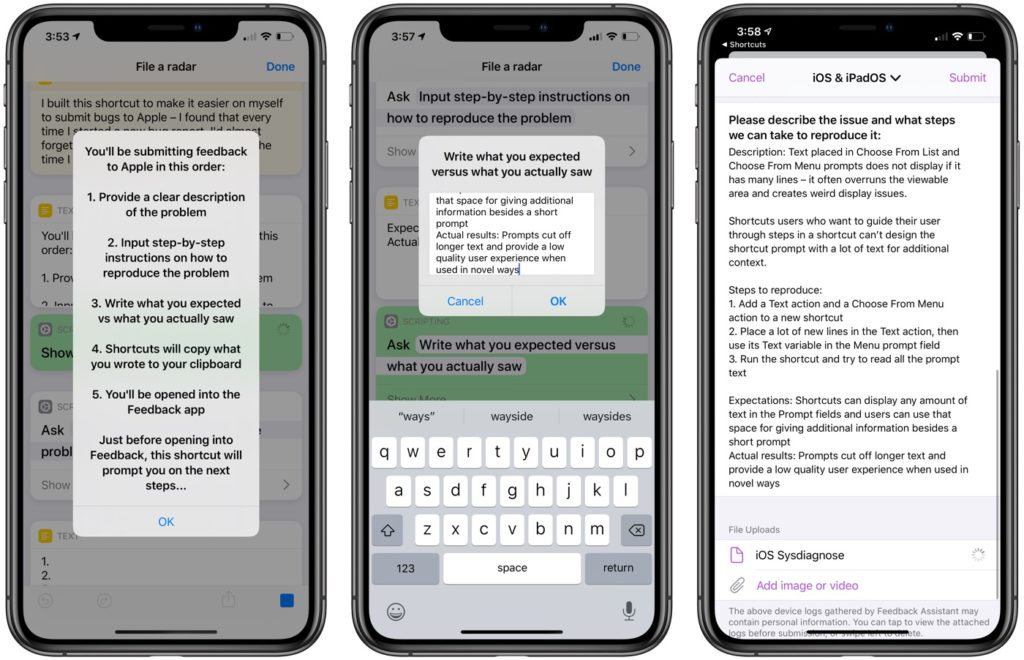
Demonstration screenshot showing the File a radar shortcut as it’s run, showing steps 1, 3, and 10 from the guide in the shortcuts’ comments.

So instead, this shortcut has you describe the problem first, asks you to list the steps to reproduce it, has you enter your expected results versus what actually happened, and copied it all to the clipboard.

Then, it uses Open App to go into Feedback, you fill out the menial parts of the form, and paste in your completed description.

I also found writing out the problem first helped me come up with clearer titles to my feedback, which likely helps the reviewer understand the problem a bit quicker too.

Note: If possible, it helps to create a screen recording or take a screenshot first too before running this shortcut.


Get the shortcut or view a full screenshot of the shortcut.

Posts You Might Like

New in the Shortcuts Library: ChatGPT for Mac shortcuts
Get my folder of ChatGPT shortcuts for the new native Mac app – control the main window, activate the launcher, and start new chats.
Shortcut to set Alarms for today’s Calendar events »
Use this shortcut to set an alarm in the Clock app for every one of the next day's Calendar events.
Here are 51 new actions for Shortcuts in the iOS 16 betas (so far)
Ulysses Adds Action Button & Control Center Shortcuts Alongside Table of Contents & Writing Tools »
In the latest release, Ulysses has expanded their Shortcuts support with new Action button and Control Center functions – plus a Table of Contents feature and support for Writing Tools from Apple Intelligence.