How to change back to the old Twitter app icon on iOS »

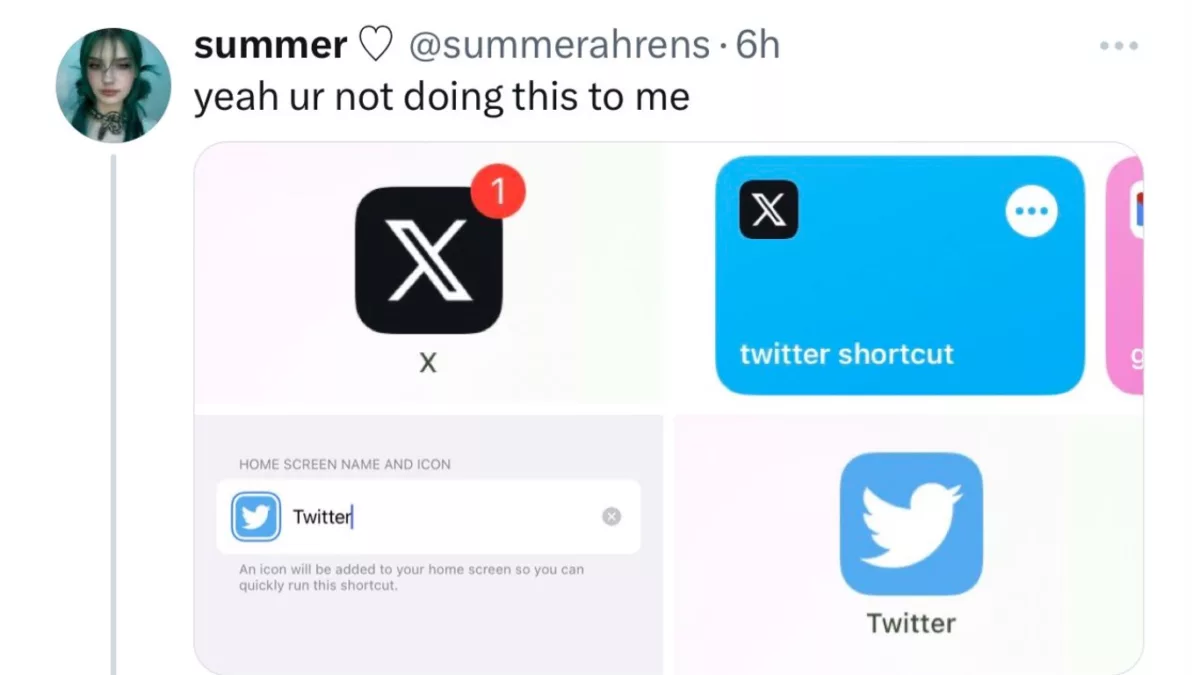
With Twitter being rebranded to X, users are looking for ways to avoid the change and get the old icon back – using Add to Home Screen in Shortcuts.

From TechCrunch:

As our Twitter apps are updating to now be called “X,” you might long for the old blue bird logo. It harkens back to a similar time, when Twitter certainly had its issues, but at least it was not owned by Elon Musk. Thanks to the shortcuts app on iOS, we can kid ourselves into believing that Twitter is still being run by a different short-sighted billionaire, rather than this even shorter-sighted one. Lucky us!

Here’s how you can change your X icon back to Twitter again:

As I joked on Twi…er, X… “Who’d have thought the world’s primary use case for Shortcuts would be app icon replacement”?

Read the full article (h/t 9to5Mac and iMore).

P.S. I just so happened to publish a guide on this method a few days ago.

Posts You Might Like

Siri Vision Pro: my Spatial Shortcuts visionOS concept video
Check out my short concept video for using Shortcuts with Apple Vision Pro. Built using the visionOS beta, these shortcuts use Open App – and I want Apple to add my simulated "pinning" functionality.
Shortcut Buttons For Apple Vision Pro Puts Floating Automations In The Space Around You
Developer Finn Voorhees has announced Shortcut Button for Apple Vision Pro, a utility that lets you place shortcuts and run them inside your spatial computing environment – coming Feb 2.
How to save Mastodon accounts to Lists using Shortcuts
When working with Mastodon accounts, there's only one place to add them to a List — the profile. With Shortcuts, I've built a tool that lets you add someone to a list from your timeline, a status post, or any link.
7 Shortcuts Stephen Robles Uses Every Day »
Check out this video from Stephen Robles covering screenshot tips, hotel hacks, and convenient features for Apple Podcasts.