File a radar

Guides you through the process of filing Feedback to Apple (previously called Radar). This explains the process in a pop-up, has you type up the problem through a series of prompts before even starting a new ticket, then guides you again on how to easily fill out the form, before finally opening into Feedback.

New shortcut File a radar for iOS 13 beta users:

Guides you through the process of filing Feedback to Apple (previously called Radar).

This explains the process in a pop-up, has you type up the problem through a series of prompts before even starting a new ticket, then guides you again on how to easily fill out the form, before finally opening into Feedback.

I built this shortcut to make it easier on myself to submit bugs to Apple – I found that every time I started a new bug report, I’d almost forget the description of the problem by the time I got to that field.
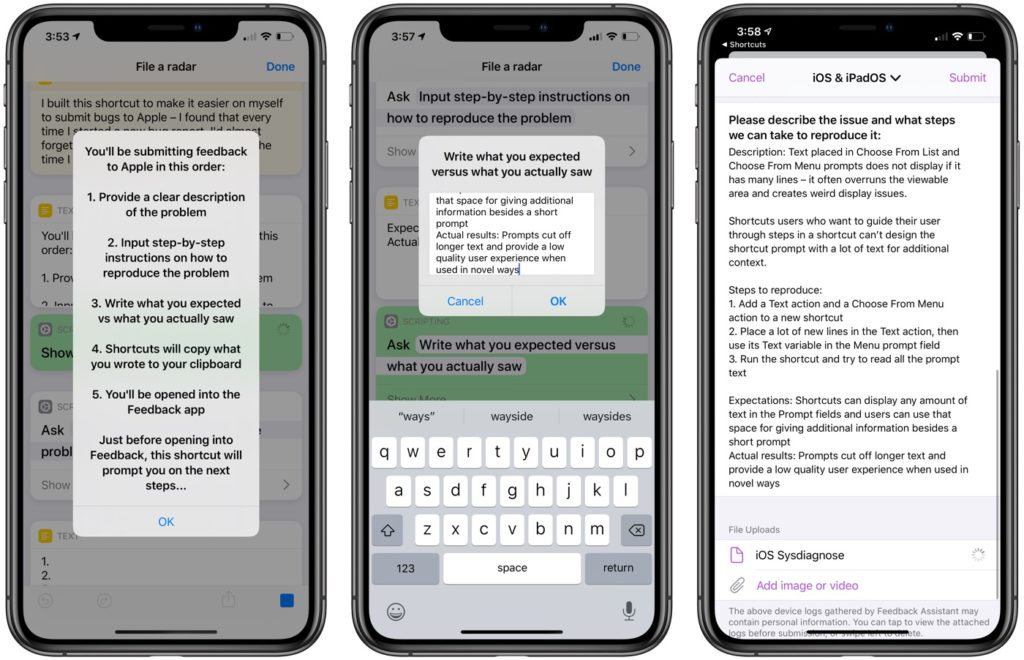
Demonstration screenshot showing the File a radar shortcut as it’s run, showing steps 1, 3, and 10 from the guide in the shortcuts’ comments.

So instead, this shortcut has you describe the problem first, asks you to list the steps to reproduce it, has you enter your expected results versus what actually happened, and copied it all to the clipboard.

Then, it uses Open App to go into Feedback, you fill out the menial parts of the form, and paste in your completed description.

I also found writing out the problem first helped me come up with clearer titles to my feedback, which likely helps the reviewer understand the problem a bit quicker too.

Note: If possible, it helps to create a screen recording or take a screenshot first too before running this shortcut.


Get the shortcut or view a full screenshot of the shortcut.

Posts You Might Like

iOS 27: Quickly Toggle Your Automations With New Filters in Shortcuts
New filters in Automations for Turned On and Turned Off make it easy to view your automated shortcuts and toggle them as needed.
How to build an App Intents Spotlight integration using Shortcuts »
Apple has introduced a new feature to display App Intents in Spotlight – Antoine Van Der Lee wrote up how he implemented the change in his app WeTransfer.
Automation Academy: Federico Viticci’s Collection of Advanced Shortcuts for Things »
MacStories editor Federico Viticci has shared his set of shortcuts and automations for interacting with your day's tasks in Things – check out the post from Club MacStories.
How to copy meeting availability across multiple calendars using Shortcuts
Jason Snell's update of a meeting shortcut for a friend helped me update a classic calendar workflow with a new method.