iOS 16.4 beta: New Shortcuts actions for Stage Manager, Intercom, VPN, Always-On Display coming

Apple has added 11 new Shortcuts actions in the iOS 16.4 developer betas – learn about new capabilities for Stage Manager, the iPhone 14's Always On Display, Intercom on HomePods, and VPN control.

Today, Apple posted the first developer beta for iOS 16.4, iPadOS 16.4, macOS 13.4, and watchOS 9.4 — as is tradition, the Shortcuts community rushed to download the new betas and checked for new actions available in the app.

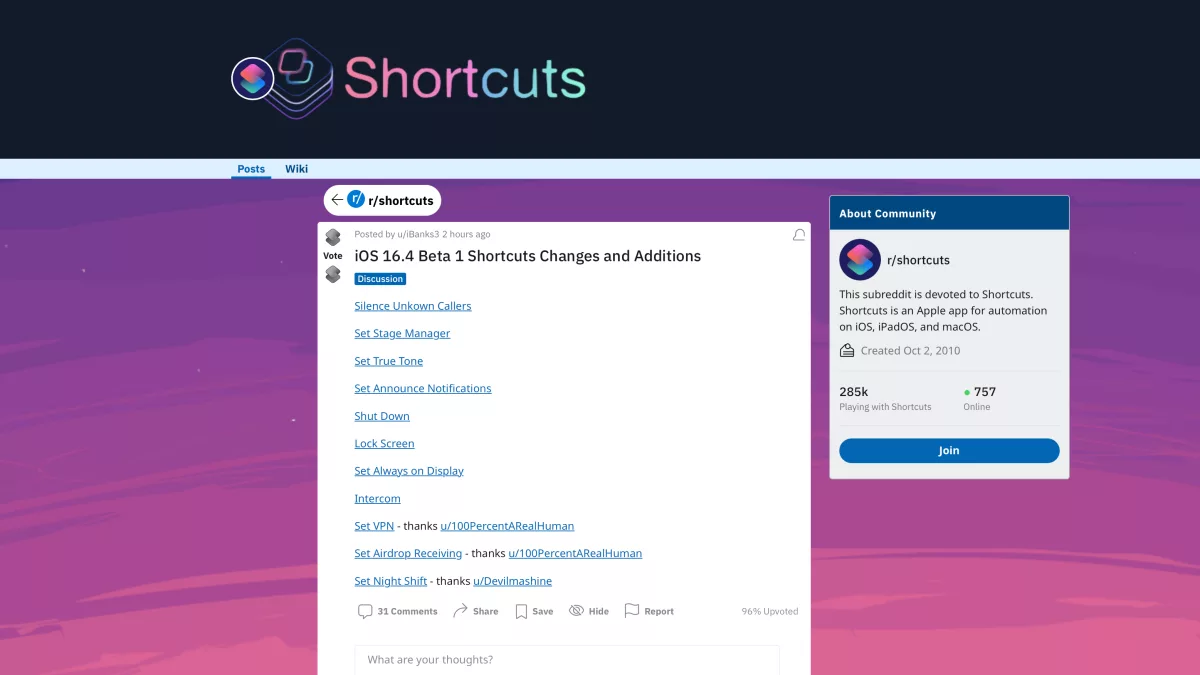
On Reddit, r/shortcuts moderator u/ibanks3 has posted a full list with links to screenshots of each action – here’s the list so far:

  1. Silence Unknown Callers
  2. Set Stage Manager
  3. Set True Tone
  4. Set Announce Notifications
  5. Shut Down
  6. Lock Screen
  7. Set Always on Display
  8. Intercom
  9. Set VPN
  10. Set Airdrop Receiving
  11. Set Night Shift

I’m excited to test these actions myself and build out a new set based on what’s possible — members can look for those soon (ahead of the public release once iOS 16.4 is out as well).

Plus, now’s the best time to file or update Feedback reports to Apple to increase the likelihood that your existing issues get development time during this current beta cycle – time to get to reporting!


View the post on Reddit.

Posts You Might Like

New in the Shortcuts Library: ChatGPT shortcuts
Get my shortcuts that take advantage of ChatGPT's actions for Start New Chat and Start Voice Conversation, from simple activation to advanced processing with other apps.
Apple should add a Lock Screen widget for Shortcuts
Apple's big addition for iOS 16 was Lock Screen widgets, but their powerful automation app was left out. In my column for iMore, I took a look at the history of Shortcuts and argue why it dictates the widget should get added.
iPad Pros #58: Shortcuts 3 (with Matthew Cassinelli)
In another guest appearance on the iPad Pros podcast, Tim Chaten had me on to talk all about the next version of Shortcuts that is built into iOS 13. (Make sure to listen to episodes 41 & 42 for last year’s recap as well).
Using Shortcuts to open into Twitter Lists
How I fixed my Twitter List shortcut – and how to put a bunch of shortcuts in your Today View as a widget.