


Search Fandango
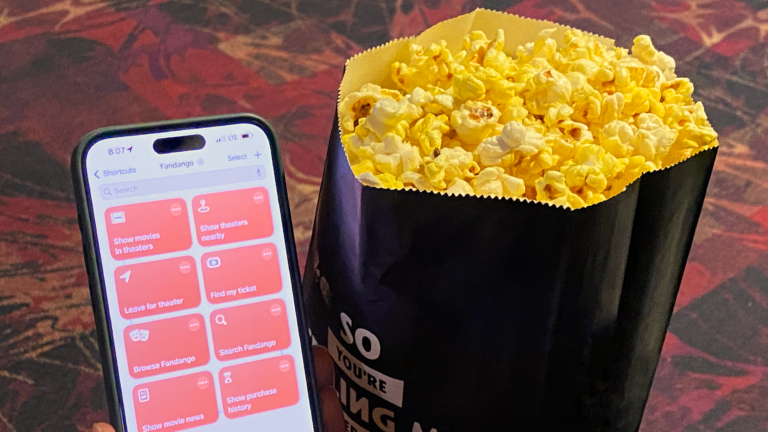
Asks you to enter a query, then reformats it for Fandango’s search results and opens the URL into the app or website.

Find my ticket
Shows your recent movie ticket to be scanned by the ticket taker – or tap to open your ticket details.

Show movies in theaters
Opens Fandango to the section with movies available to go see now in theaters.

Browse Fandango
Opens the Fandango app when run from iPhone or Fandango.com when run from other devices.

Leave for theater
Checks for a movie calendar event (automatically added via Gmail when you purchase tickets) and presents the total travel time estimates, then opens Apple Maps to get directions.

Show theaters nearby
Gets your current ZIP code, then opens Fandango to movie times in your area.

Open Living Room apps
Opens a set of apps designed for everyday use in the living room – includes Books, Home, Calendar, Podcasts, News, Streaks, and Structured.

Open Accessibility Shortcut preferences
Opens the deep link into Settings > Accessibility > Accessibility Shortcut to let you configure the Side Button to toggle accessibility feautres on or off.
Choose between Apple Watch Mirroring, AssistiveTouch, Background Sounds, Classic Invert, Color Filters, Control Nearby Devices, Detection Mode, Dim Flashing Lights, Increase Contrast, Left or Right Balance, Live Captions, Live Speech, Magnifier, Reduce Motion, Reduce Transparency, Voice Control, Reduce White Point, Smart Invert, Switch Control, VoiceOver, Zoom, Full Keyboard Access, and Speak Screen.

Open my shortcuts
Opens the “My Shortcuts” view to show only your custom shortcuts and no App Shortcuts.

Open Books library
Changes the Books app view to the Library tab to show all your Books, PDFs, Samples, and more.


Change Books Theme
Presents the various Themes in Books to choose from, then applies the setting of your choice.

Automators Membership
Enhance your experience with bonus shortcuts, folder bundles, and exclusive perks.


Action Directory
Discover endless possibilities by combining the building blocks for Shortcuts.