Use This Automation To Protect Your iPhone If Stolen While Unlocked

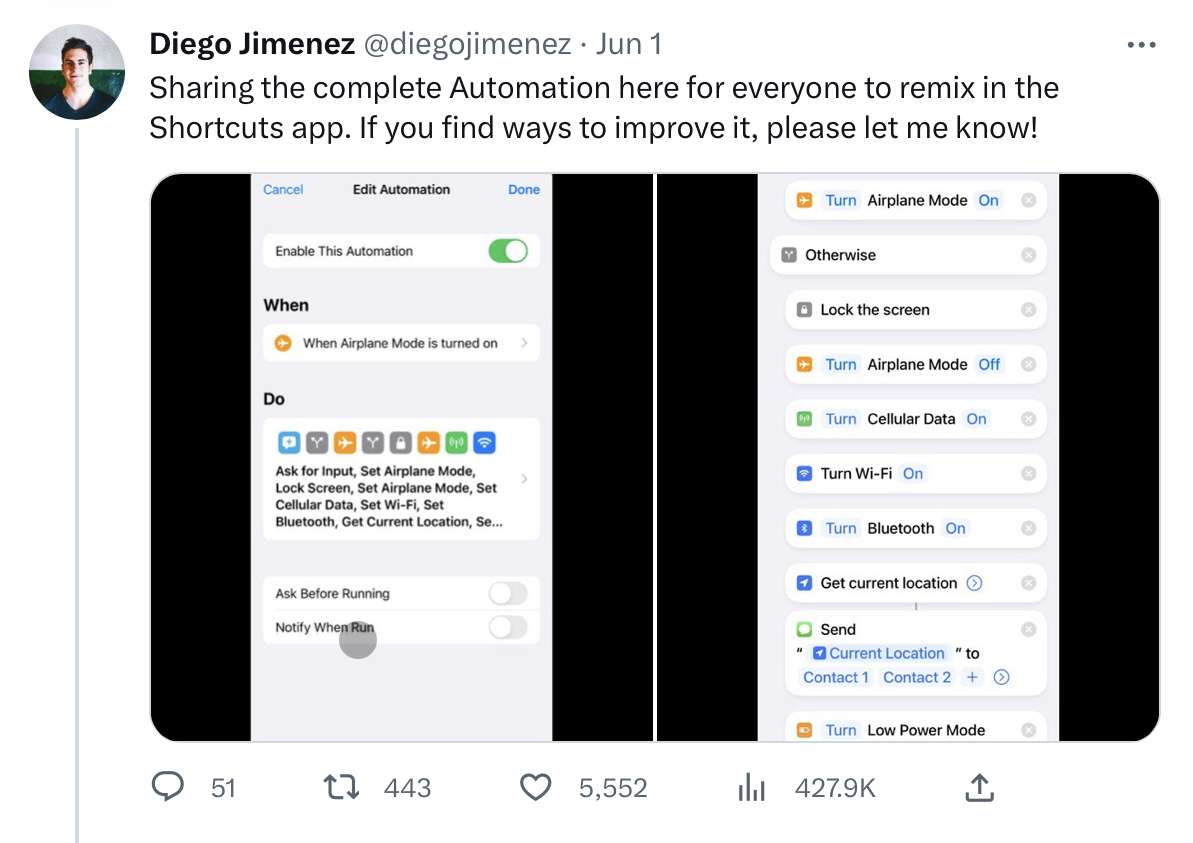
Diego Jimenez has put together a clever shortcut for securing your iPhone using the Lock Screen action that works as a Personal Automation when Airplane Mode is activated.

Diego Jimenez on Twitter:

I made a quick Automation to protect my iPhone if someone steals it while unlocked:
If they turn on Airplane Mode (Find My), it asks for a passcode.
If wrong… it automatically locks the phone ?, turns ON all connectivity ? + Low Power Mode ?, and shares its current location?

This is a clever use of the newest “Lock Screen” action available in iOS 16.5 – it’s a Personal Automation set up for the Airplane Mode trigger.

If your phone is already locked, a thief can’t get in to disable Find My; but, if your phone is grabbed out of your hands after entering your passcode, this shortcut will reverse any attempts to wipe the device, plus fully lock them out while enabling you to continue tracking it.

View the demo video on Twitter and check the ongoing thread for the latest version.
Posts You Might Like

“Make your Mac dance” with MacSparky’s Keyboard Maestro Field Guide
David Spark’s latest Field Guide has been my guide for learning Keyboard Maestro, the Mac automation multitool that’s crazy useful.
Apple releases new Final Cut Camera app, plus smart updates to Final Cut Pro for iPad and Mac »
Apple has released a new Final Cut Camera app to tie in with Live Multicam in Final Cut Pro 2 for iPad – and the Mac version has new smart features as well.
Automators Talk Personal Automation Fun »
My pals Rosemary and Orchard are back with another episode of Automators on their favorite automations – listen on Relay FM.
New in the Shortcuts Library: Arc Search shortcuts
Get my shortcuts for Arc Search for iPhone. Pass in your query with the keyboard or dictation, get Arc to browse for you, or call in.