Automation Academy: Federico Viticci’s Collection of Advanced Shortcuts for Things »

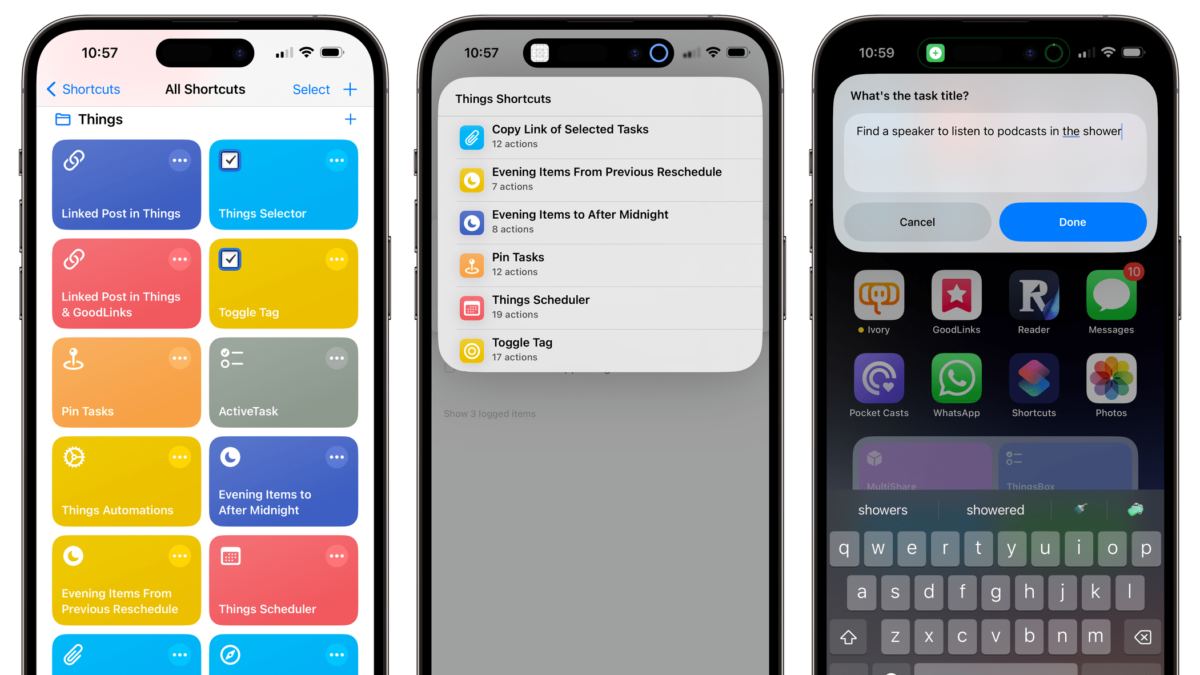
MacStories editor Federico Viticci has shared his set of shortcuts and automations for interacting with your day's tasks in Things – check out the post from Club MacStories.
Automation Academy: Federico Viticci’s Collection of Advanced Shortcuts for Things »

From Federico Viticci on Club MacStories:

A few months ago, I decided to switch to Things as my default task manager. As I shared multiple times on AppStories and MacStories Weekly, I’m really happy with my decision: not only does the design of the Things app create a more relaxed environment for me to manage my responsibilities, but Cultured Code’s embrace of Shortcuts automation has allowed me to create dozens of custom enhancements for Things.

This is the reason why I fell in love with Things: the app’s “simple” design and structure leaves room for power users to make their own functionalities by taking advantage of the app’s integration with Shortcuts. Things doesn’t have a feature you need? Just make it yourself by choosing from the large catalog of Shortcuts actions available in the app.

I previously shared an initial set of shortcuts I created for Things; I also created ThingsBox, an advanced shortcut to intelligently save tasks to the Things inbox. Since those articles, I’ve built several more shortcuts and created personal automations to script certain behaviors of Things on a daily basis. So, exclusively for Club Plus and Premier members, today I’m sharing my full collection of Things shortcuts, which have vastly improved how I manage my tasks on the iPad Pro and capture them on the iPhone.

Let’s take a look.

Great set of shortcuts that solves some of the pain in managing tasks daily in Things.
Read the full article.

Posts You Might Like

Interactive Widgets Are Built Using App Intents: What That Means For Shortcuts »
Speaking on The Talk Show #382, Iconfactory developer Craig Hockenberry talks about the advantages for Shortcuts that will be realized off the work app developers put into interactive widgets.
How To Play A Headphones-Only Alarm On iPhone
Esther from Mastodon shared a great tip for using Personal Automations for psuedo-alarms when you don’t want to play alerts out loud – I built off her idea with a tip around Alarm automations.
7 Shortcuts for meetings and making new contacts
When you meet with someone new, you don’t want to fumble with your phone trying to capture important information. So I built 7 shortcuts to help with just that.
A New Chapter for Mac Power Users (for Stephen Robles!)
Stephen Hackett is stepping away... and Stephen Robles is stepping in! Congrats to Stephen(s) and David Sparks for continuing the legacy of this show.