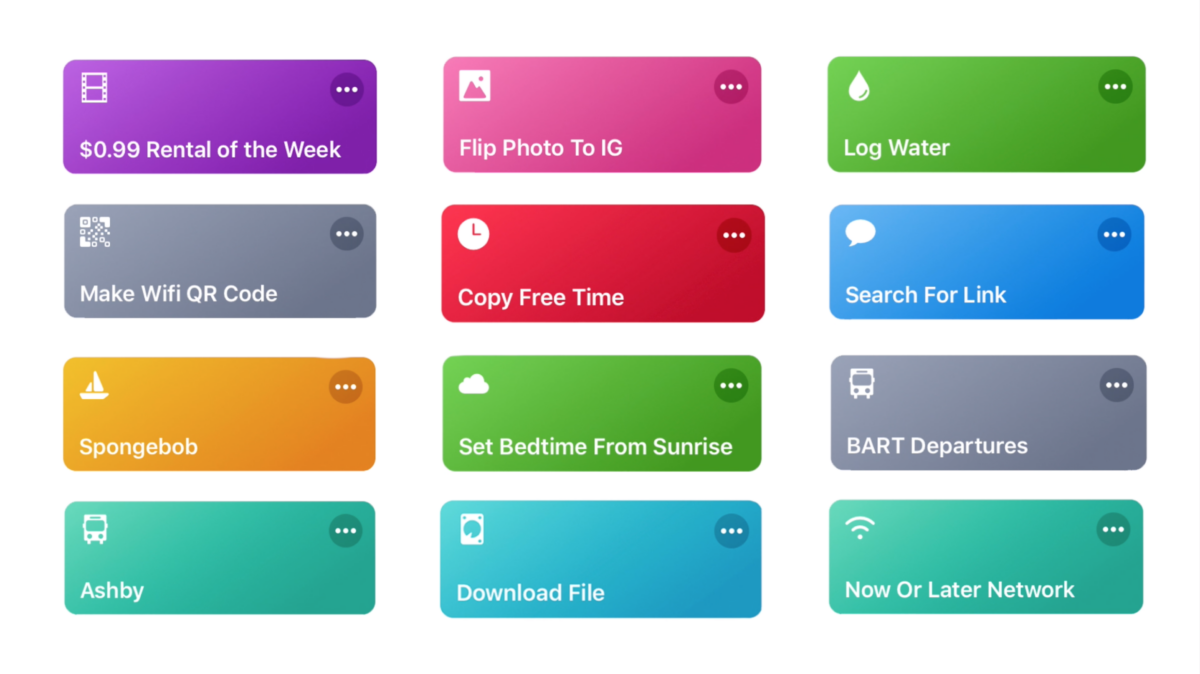

Last week, I published my third YouTube video. This one covered 10 great shortcuts that I’ve built over the years, with quick descriptions and demonstrations for each:1
Here they are in order:
1. $0.99 Rental of the Week
2. Flip Photo to IG
3. Log Water
4. Make Wifi QR Code
5. Copy Free Time or Copy Today’s Free Time
6. Search for Link
7. Spongebob
8. Set Bedtime From Sunrise2
9. BART Departures (or, just Ashby)
10. Now or Later Network (and modified Download File)
After I published, Rene Ritchie from iMore also reached out to me and asked for a short video clip with one of my tips on getting started with Shortcuts. Here’s what the full video turned out like:
I shot and put my part together for his video in just a few hours, which encouraged me to make shorter videos myself and demonstrated how tackling a specific single topic is much easier to produce.
For my own work, I’m still working through some process details – my own video was pretty long and difficult to make with so many parts, and an early version of it also just ended up not being very interesting to me. I also need to level my audio better still, plus nail down some of exactly how I am and should be using my cameras too.
I’ve also been developing criteria for which shortcuts I want to share, because, despite people wanting to see all 900 of mine, throwing them all online isn’t my goal – I want to teach people how to build their own, not just use my pre-built shortcuts.
Plus, I’ve completely shifted my schedule to allow for both video production AND writing – I fell off the map a bit getting my thoughts out here and on iMore/The Sweet Setup since starting to make videos.
So enjoy the shortcuts from the video, subscribe to my channel if you haven’t yet, and subscribe to my RSS feed to have these blog posts come directly to you too.
- Well, as quick as possible – it’s 17 minutes :) ↩
- Note: requires Shortcuts 2.1 beta – use Set Bedtime From Sunrise (Dark Sky) if you’re on Shortcuts 2.0. ↩