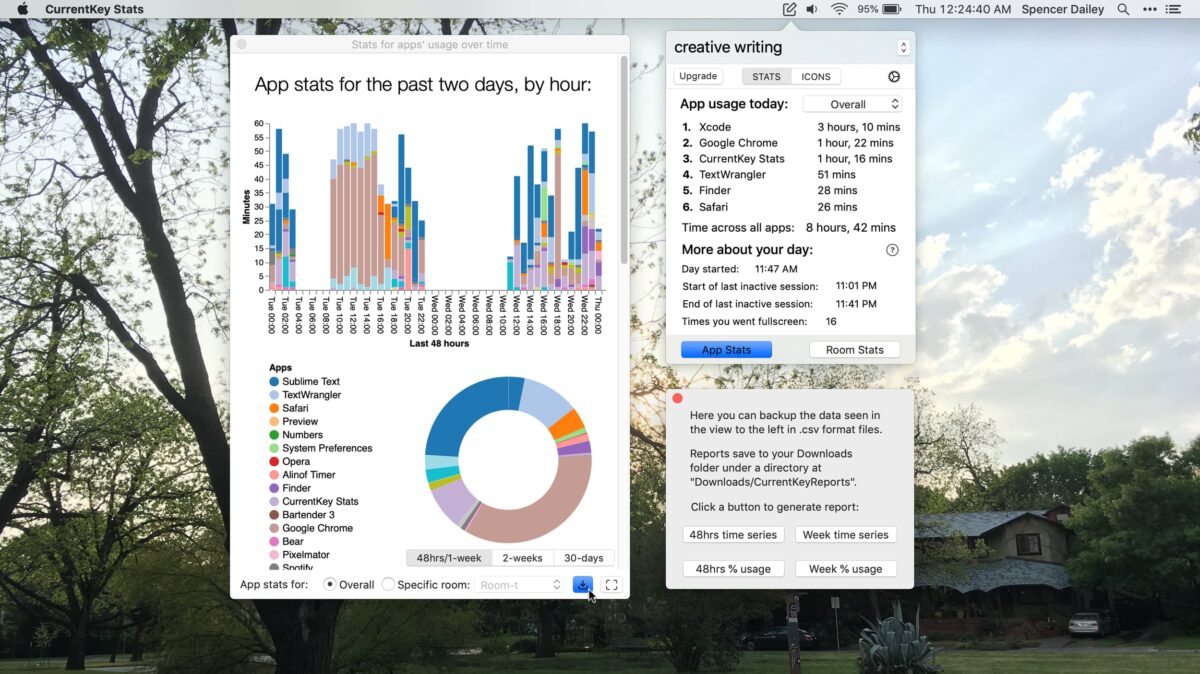
CurrentKey Stats, a workspace customization app for Mac from developer and journalist Spencer Dailey, has added a unique ability to update your workspace Menu Bar icon using any image – and it’s accomplished using AppleScript (and Shortcuts, if you want).
The app is designed to separate your Mac into workspaces, changing spaces depending on the app and tracking time spent within each space – a great idea in itself. Since the app functions using a mix of keyboard commands and Menu Bar actions, you’re often switching contexts quickly and using the Menu Bar icon as a reference for which space you’re in.
Using that same idea, CurrentKey has added an AppleScript command to customize that icon on the fly, regardless of other customization, using what’s called Script Images – at any moment, a script could come through and update the Menu Bar icon with the new Script Image, providing a visual but minimal status update in a place you’re already checking regularly.
Using a set of predefined Script Images, which are similar to custom emoji, which you’ve loaded into the app, you can use an AppleScript command line like this to change the icon:
tell application "CurrentKey Stats" to display_image imagename "happy" optional_duration 5
When run, it’ll display the happy image for 5 seconds – or any image and duration of your choosing.
Combined with all the possible types of Mac automation, there’s a lot of interesting possibilities – CurrentKey gives an example of a custom Mail rule that automatically triggers the icon change when an email is received. In another example, the icon change can trigger at the end of a shortcut, using the Run AppleScript command in Shortcuts.
I’m intrigued by CurrentKey’s capabilities for Mac customization – I’ve attempted to replicate my Home Screen setup on iPad using Spaces on Mac and it’s somewhat fallen apart, but only because there’s a limited set of controls and I tend to approach these with a maximalist setup. It’ll take time to test (and stress test) the setup for my needs and figure out fun ways to update the icon within my shortcuts, but I’m intrigued with the possibilities – I haven’t noticed much movement in the Mac customization space lately and CurrentKey overall feels like a fresh approach in a storied area.
CurrentKey Stats is a subscription-based app, with a 1-month free trial and a $2.49 USD monthly subscription available via in-app purchase (and is not offered in the EU).
Check out CurrentKey Stats on the Mac App Store, read about how to create custom icon alerts with Script Images, and learn more about CurrentKey Stats on their website.