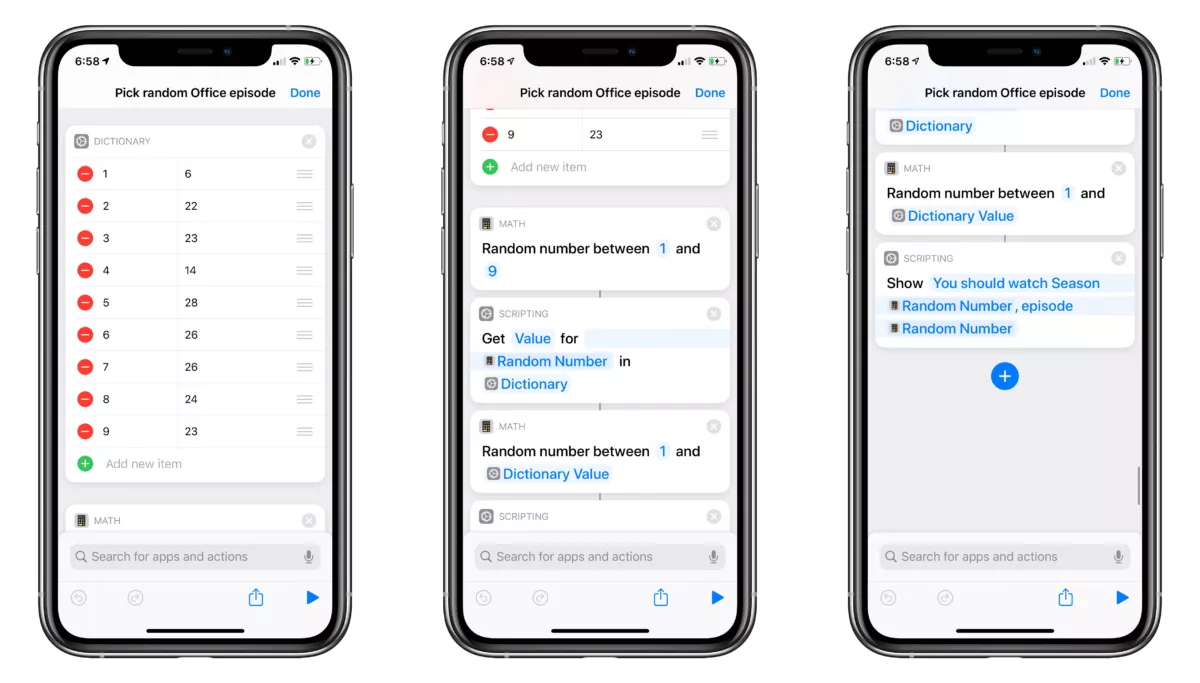
If you love The Office and want to have a random episode picked for you, this shortcut is for you:
Using a dictionary filled out with the season numbers and corresponding episode counts for each, this picks a random season, then episode, then displays it in an alert as Netflix opens on the Apple TV.
Works aloud when run from Siri; good for HomePod.
After watching every season of The Office too many times, my girlfriend and I started picking random episodes to watch.
At first we just asked Siri for a random number between 1 and 9, then would find the episode counts and then ask for a random number again; so, I built this shortcut to make it faster each time and easier to try again if we wanted a different option.
This can easily be recreated for any show too – add in the seasons and episode counts, change the name, and you’re good to go!