How to build an App Intents Spotlight integration using Shortcuts »

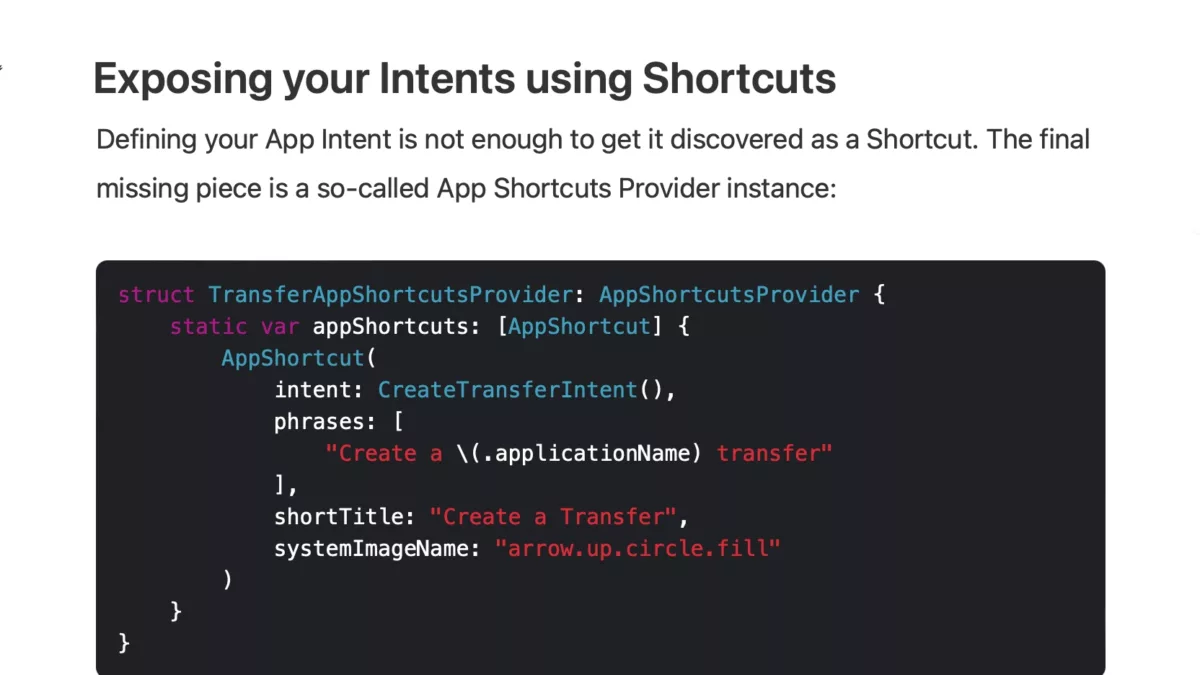
Apple has introduced a new feature to display App Intents in Spotlight – Antoine Van Der Lee wrote up how he implemented the change in his app WeTransfer.

Antoine Van Der Lee on his blog SwiftLee:

App Intents have been new since iOS 16 and offer a programmatic way to service your app’s content and functionality to Siri and the Shortcuts app. New in iOS 17 is the option to surface App Shortcuts integrated into Spotlight, making your app’s functionality even more discoverable.

App Intents are the engine behind many features like Widgets and Live Activities. By using them smartly, you’ll create a reusable framework for your app’s functionality. For example, the App Intent we’re creating for Spotlight Shortcuts could be reused for interactive widgets

What a great walkthrough – here’s the sections:
View the full post on avanderlee.com (via Justin Ferrell).

Posts You Might Like

Set Up Your Shortcuts on Stream Deck with This Plugin from Sentinelite
If you work at a Mac desktop, there's no better way to run your shortcuts than using a Stream Deck – this plugin from Sentinelite makes setting up all your shortcuts seamless.
How to use Mastodon’s API to open your Lists with Shortcuts
Building up your Lists in Mastodon is important – so is accessing them quickly when you need them. Using Apple's Shortcuts app, I built a tool that makes a web request to Mastodon's API and lets you return all your Lists to open from.
How to run shortcuts using Audio Hijack’s automation features »
Dan Moren shared this great automation for Audio Hijack to move his episodes to Dropbox after each recording – and I'm saving his Run Shortcut method for later.
Shows a screenshot from the Shortcuts app with “Get Current Weather,” “Get the Device name,” an “If” action set to “If Device Name contains iPad”, then “Show Result,” otherwise “Log Health Sample” and then “Show Alert.”
Log your sun exposure with an Apple Watch automation ⌚️