From Apple Newsroom:
Search and Take Action with Updates to Visual Intelligence
Visual intelligence, which builds on Apple Intelligence, now helps users learn and do more with the content on their iPhone screen. It makes it faster than ever for users to search, take action, and answer questions about the content they’re viewing across their apps.
Users can search for the content on their iPhone screen to find similar images across Google, as well as apps that integrate this experience, such as eBay, Poshmark, Etsy, and more. If there’s an object a user is interested in learning about, like a pair of shoes, they can simply press the same buttons used to take a screenshot and highlight it to search for that specific item or similar objects online. And with ChatGPT, users can ask questions about anything they’re viewing onscreen.
Continue playback of video: Visual Intelligence on iPhone 17 Pro
Updates to visual intelligence help users learn and do more with the content on their iPhone screen.
Visual intelligence enables users to summarize and translate text, as well as add an event from a flyer on their iPhone screen to their calendar, with a single tap.
Users can also take advantage of these capabilities by using visual intelligence with their iPhone camera through Camera Control, the Action button, and in Control Center.
And:
Build Intelligent Shortcuts
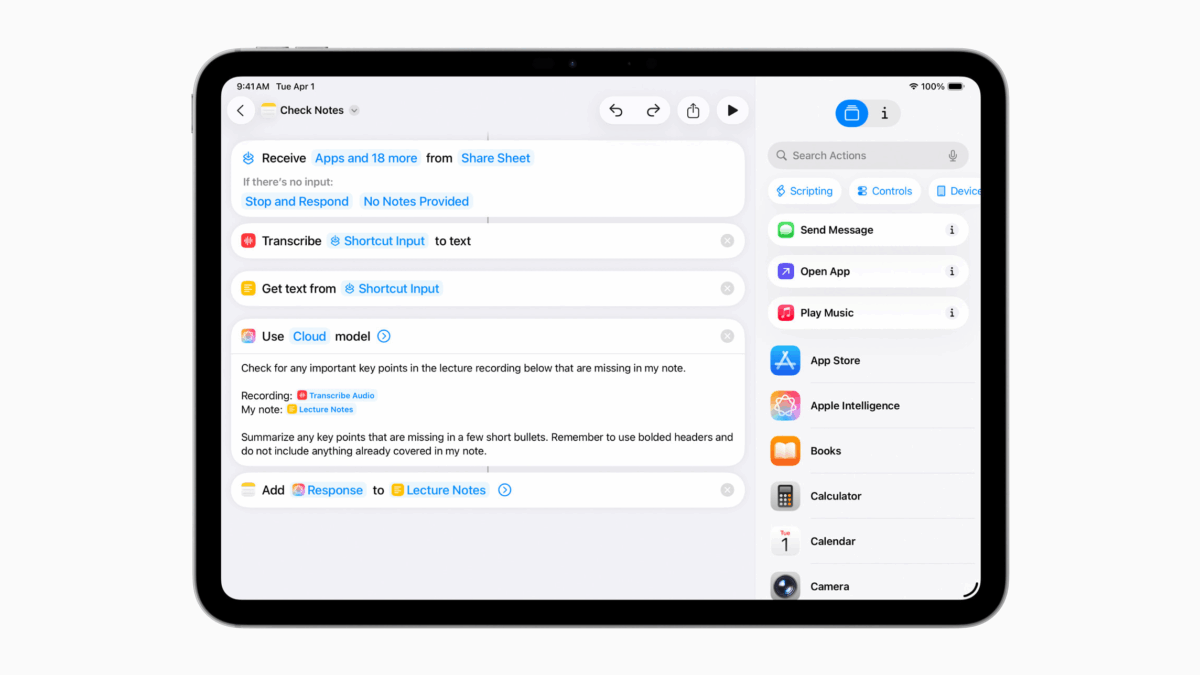
Shortcuts help users accomplish more faster, by combining multiple steps from their favorite apps into powerful, personal automations. And now with Apple Intelligence, users can take advantage of intelligent actions in the Shortcuts app to create automations, like summarizing text with Writing Tools or creating images with Image Playground.
Users can tap into Apple Intelligence models, either on device or with Private Cloud Compute to generate responses that feed into the rest of their shortcut, maintaining the privacy of information used in the shortcut. For example, users can create powerful Shortcuts like comparing an audio transcription to typed notes, summarizing documents by their contents, extracting information from a PDF and adding key details to a spreadsheet, and more.