14 Shortcuts for Safari Views, Tab Groups, and Focus Filters to use with iOS 16

Yours truly for iMore:

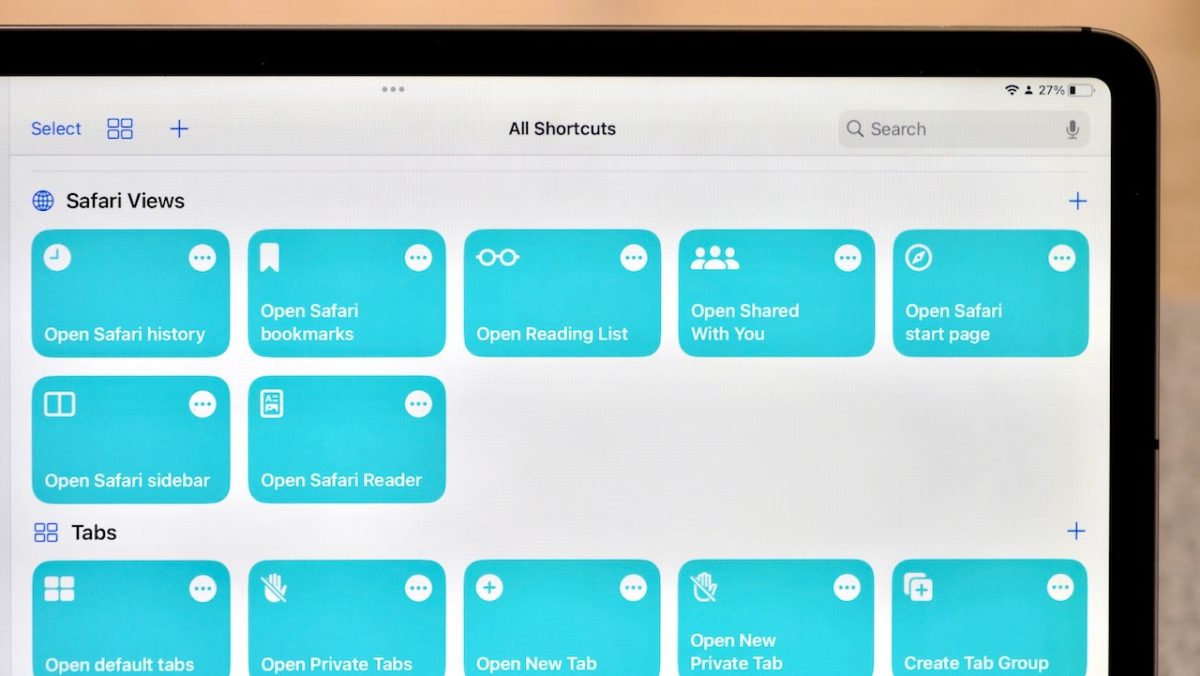
Safari has gained six actions of its own so far in the betas:

1. Open View
2. Open New Tab
3. Open New Private Tab
4. Create Tab Group
5. Open Tab Group
6. Set Safari Focus Filter

[…]

Currently only available for developers and public testers (but coming to everyone this fall), these actions are aimed at interacting with different “views” in Safari, plus creating tabs and doing basic Tab Group management.


To help you take full advantage of these, here are 14 shortcuts built out with each potential option across the actions so that you don’t have to build them yourself:
Read the full story on iMore.

Posts You Might Like

What’s New in Shortcuts in iOS 27 Beta 5
Apple has a new splash screen covering the three main features in iOS 27: Describe a Shortcut, Broad World Knowledge, and Unified Automations.
iOS 16’s sleeper hit? Focus Filters might change how you use Apple devices forever
iOS 16's Focus Filters add powerful contextual controls to iOS, iPadOS, and macOS — here's how this feature will affect how people will use Apple devices.
Shortcuts Live: Working with Safari Tabs in iOS 16 Public Beta 2
Tune into the latest episode of Shortcuts Live, where I streamed for a little over an hour covering the new Find Tab action that I discovered in iOS 16 public beta 2.
16 ways to use Personal Hotspot with Shortcuts in iOS 16
I asked the Twitter community about Personal Hotspot — and made different Personal Automations for their responses.