New shortcut: Activate Claude Code (Subscribers Only)

If you're using Claude Code, here's a shortcut to set up your environment immediately from your preset list of directories.

Hello dear subscribers,

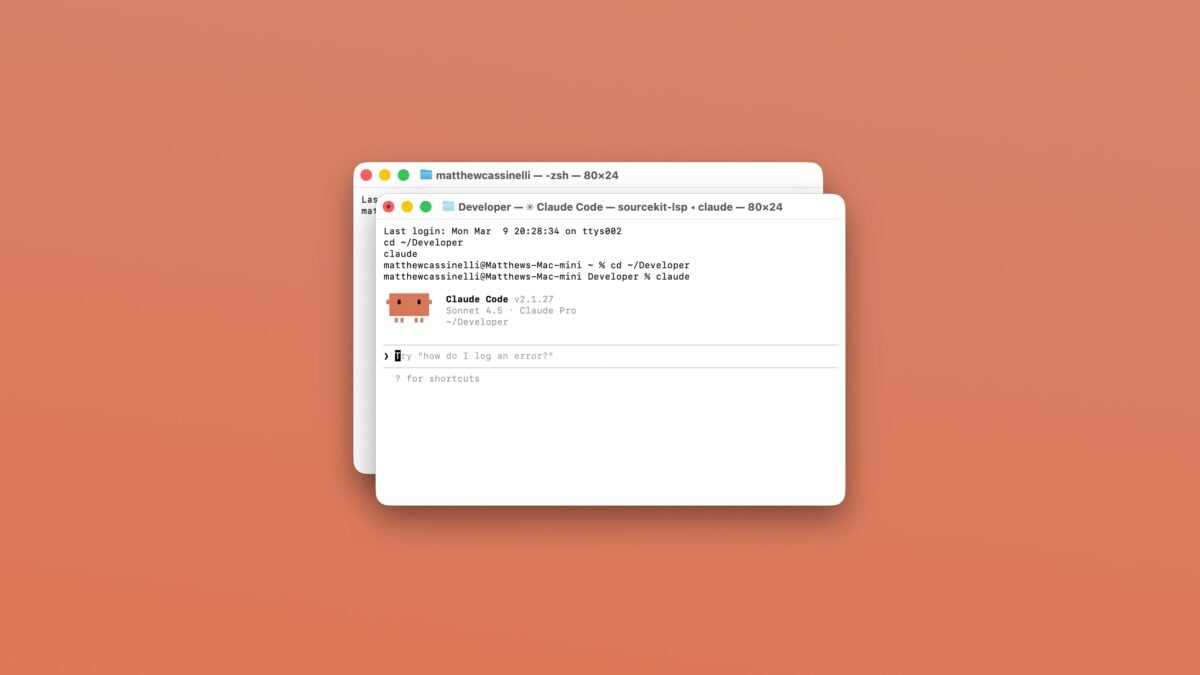
Here’s a new addition to the Shortcuts Library to try out if you’re playing around with Claude CodeActivate Claude Code, a simple launcher that automatically fills in the directory and launches Claude in the Terminal.

Content for subscribers only

Already have an account? Sign in

Featured Shortcuts

shortcut-activate-claude-code-icon
Activate Claude Code
Opens the Terminal and changes directories to ~/Developer, then runs `claude` to start Claude Code.

Optionally, choose from a menu of multiple directories.

Posts You Might Like

New shortcut: Crop Podcast Artwork with Pixelmator
Built for linking to podcasts mentioning my work, this shortcut uses Apple Podcasts and Pixelmator Pro for Mac to perform a ML crop on the show artwork to generate a 16x9 image for a blog post.
Tip: Create ~/Developer in Your Mac User Folder for AI Projects
If you're building with a Terminal chatbot, make yourself a Developer directory to store all your projects.
How to run Shortcuts via the Stream Deck
My Shortcuts for Apple’s Software Update & Public Beta program
Apple's new public beta program for iOS 17 has been released – use these shortcuts to quickly access each update and check the release notes for what's new.