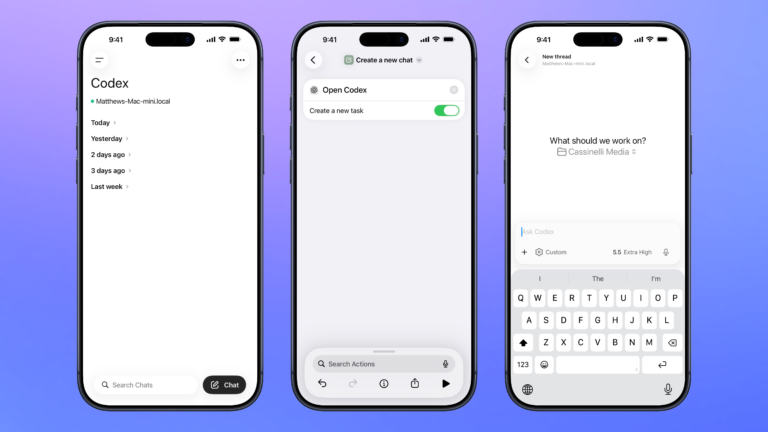


Control Codex remotely
Open the Codex experience in the ChatGPT app so you can remotely manage threads running on your Mac, plus search, organize, or create a new chat.

Create a new chat
Opens the Codex experience in the ChatGPT app and create a new task where you can start a thread for any project.

Open from my Comics
Given a preset dictionary of your comic titles and unique IDs, asks you to pick which comic to open on the web.

Show all my Health records
Opens into the Health app to the Health Records section of your Profile where you can see accounts, export Health Records to PDF, show Apps and Research studies, and change options like data sharing and analytics.

Show Kitchen Tools and Techniques
Opens the section for Kitchen Tools and Techniques in the new Food section for Apple News+ subscribers.


Search for emails in Notion Mail
Asks you to search for emails, then opens the URL into Notion Mail with your query.

Scrape Threads post
Accepts a Thread link as input, extracts the username and excerpt, and formats it with multiple link types into a JSON dictionary shared as output.

Automators Membership
Enhance your experience with bonus shortcuts, folder bundles, and exclusive perks.


Action Directory
Discover endless possibilities by combining the building blocks for Shortcuts.