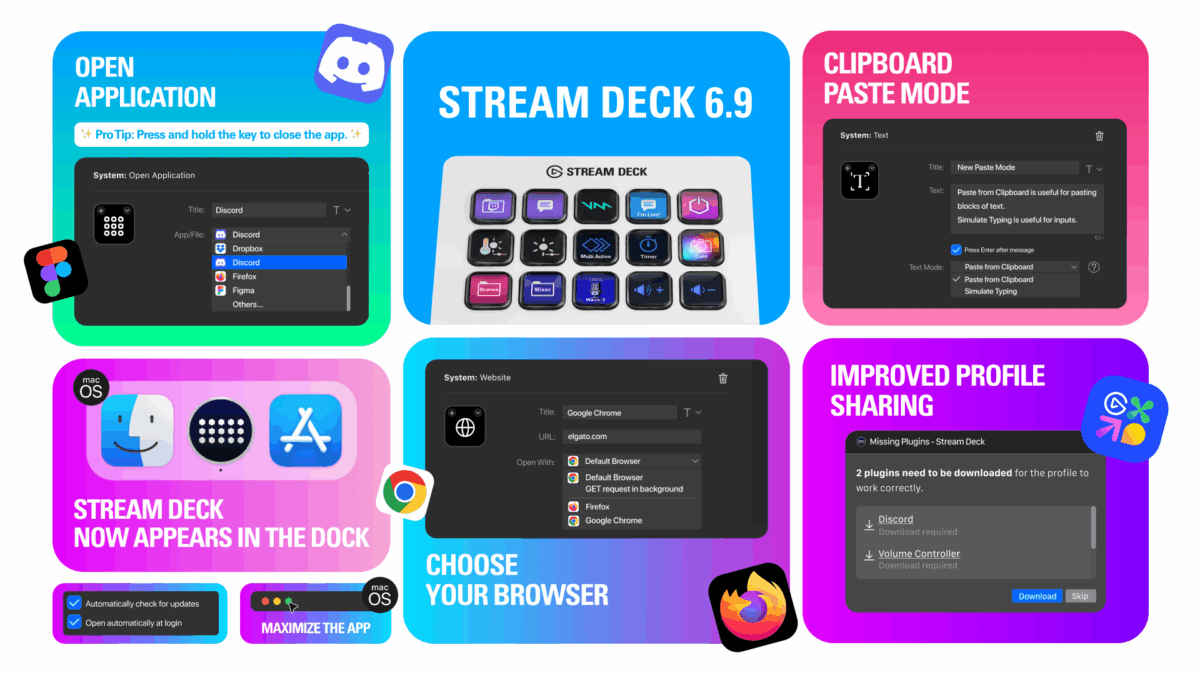
My friends at Elgato have updated the Stream Deck app for Mac for version 6.9 with new features for launching and closing an app from the same key, paste from clipboard in Text actions, the ability to choose your browser when opening URLs, and quality-of-life improvements specifically to make the app more Mac-like.
Here’s how they describe the updates:
🆕 Open App – From launch to close, all on one key
Launching your favorite apps just got easier. The new Open Application action shows a searchable list of installed programs—no file path hunting required.
And it now works with Windows Store (UWP) apps like Discord, Spotify, and Microsoft Teams.
✨ Pro tip: Press and hold the key to close the app. Quick in, quick out.
[…]
📝 Text Action – Now with Clipboard Paste Mode
The Text action now includes paste mode selection with options for simulating typing or pasting from clipboard. Simulate typing is exactly that—its as if you’re typing the text. Paste from Clipboard is new and text is pasted as if you’ve pressed CTRL/CMD+V. The default mode has been changed to Paste from Clipboard.
Simulate Typing is useful for programs that need inputs, like typing out commands in sim games
Paste from Clipboard is useful for chat applications, when you want to paste a block of text as a single message
[…]
🌐 Website Action – Choose Your Browser
Now you can choose exactly where your Website actions open. Chrome for work, Firefox for dev, Safari for testing—it’s all up to you.
Just pick from your installed browsers in the dropdown. The old “GET request in background” toggle now lives here too, tucked away for power users.
[…]
⬇️ Profiles just got smarter
Importing profiles from Marketplace? Stream Deck 6.9 now helps you hit the ground running. If a profile uses actions from plugins you don’t have, you’ll be prompted to install them automatically—no guesswork, no more question marks.
[…]
🪄 Quality of life improvements
A few small touches make a big difference:
Option to launch Stream Deck on startup
Option to disable automatic update checks
macOS only: Stream Deck now appears in the Dock when open
macOS only: You can now maximize the app using the green button
[…]
Check out the Elgato Stream Deck 6.9 Release Notes and get the Stream Deck from Elgato – be sure to sure use my discount code ZZ-CASSINELLI for 5% off.