Ulysses Writing App Adds New Home Screen and Lock Screen Widgets »

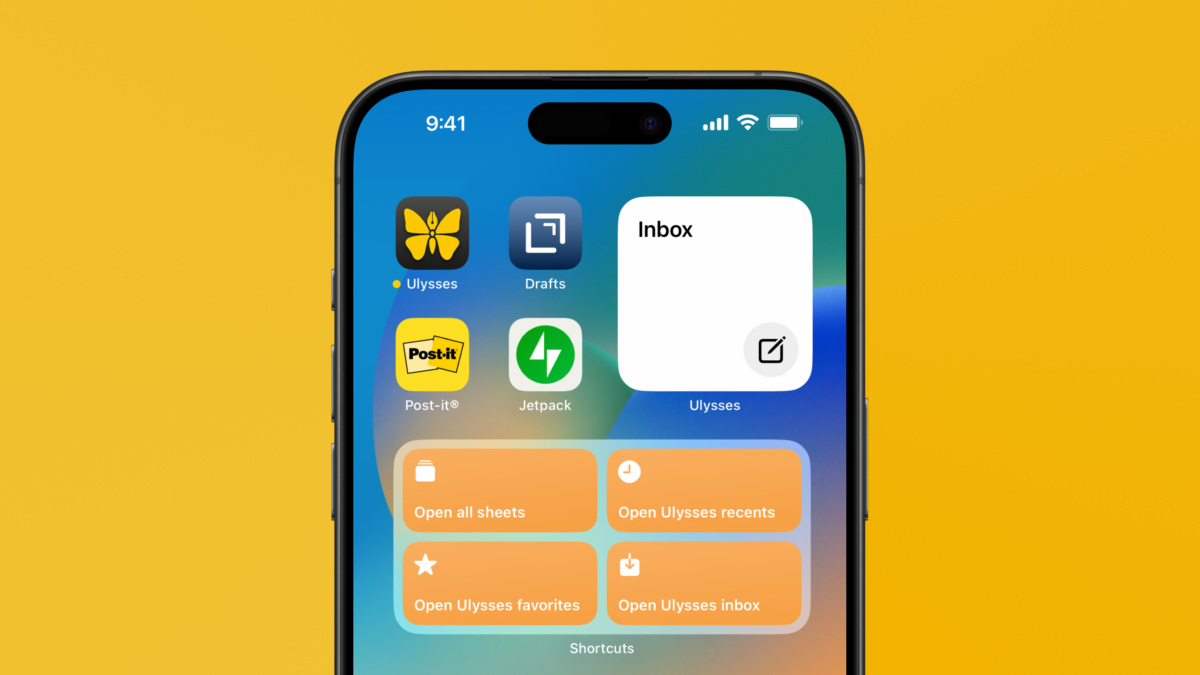
The developers of Ulysses have added Home Screen and Lock Screen widgets to the app – something I've been looking forward to for a long time.

From the Ulysses v34 release notes, quoted via 9to5Mac:

Widgets on iOS:

  • Better late then never…
  • Open projects right from your home screen.
  • Create new sheets right from your home screen.
  • Both actions are also available for your lock screen.
  • There‘s even a dedicated Inbox widget, which works similar.

I’m very, very, very appreciative of these initial widgets—check out my Writing widgets in the post header image—and have even sent detailed feedback to the team asking for more access to Groups (since I don’t use Projects) ?.

View the story on 9to5Mac and buy Ulysses on the web or get it the App Store.
Posts You Might Like

Stephen Robles on the iPhone Action Button 5 Months Later… »
Stephen Robles shares his thoughts on how to best use the iPhone Action button, now that we’ve had it for multiple months.
How to Pin Links in Apple Messages »
I'm linking Gruber who's linking AppleInsider about pinned links in Apple's Messages app – here's how it works, and why it's a bit odd right now.
Make Your Screenshots Framous (And Automate Them) With This Mac App
Wrapping your screenshots in beautiful device frames has never been easier with Framous for Mac – check out their sample shortcut.
Tip: Mark Physical Copies As Finished For Your Apple Books Year In Review
Apple Books has a new Year in Review feature, which might not be useful unless you read eBooks – here's how to log your physical books instead.