My friends at Elgato have updated the Stream Deck app for Mac for version 7.0 with new features for creating virtual Stream Decks on your computer, key logic so each key have multi-tap abilities, weather updates in a new plugin, and quality-of-life features like showing whether an app is currently open.
Here’s how they describe the updates:
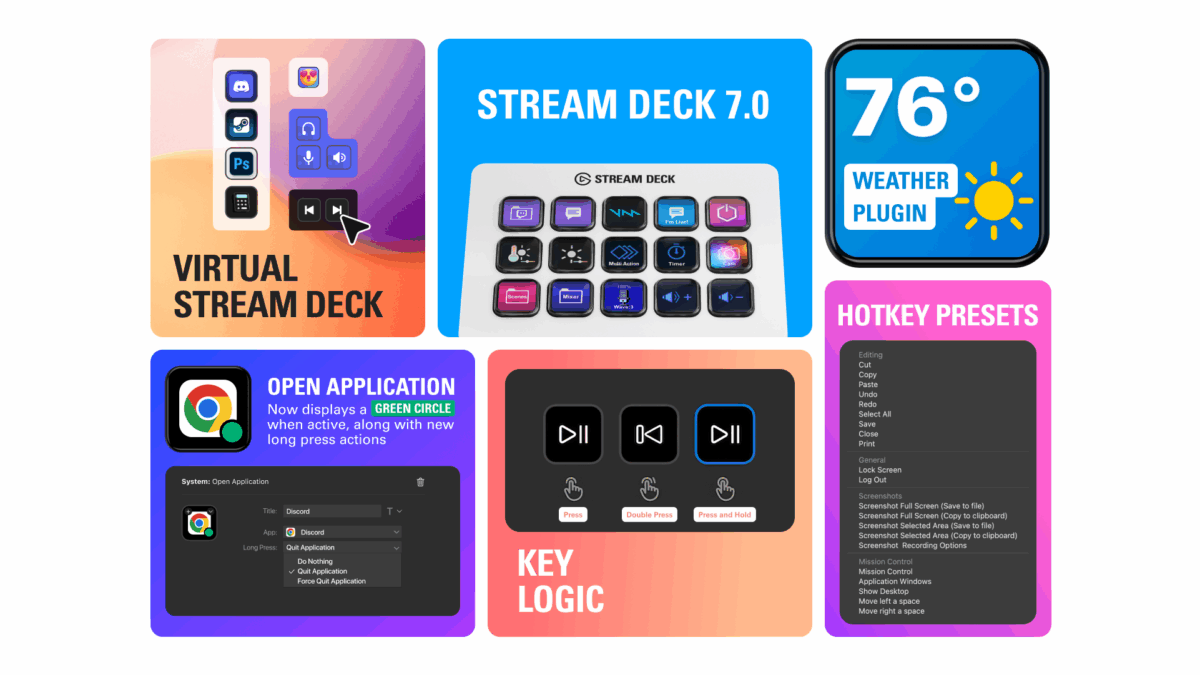
🎛️ Virtual Stream Deck — your on-screen workspace controller
Create unlimited virtual keys, customize actions and layouts, then pin them in place or summon to your cursor. It’s your OS sidekick, making every workflow fast and effortless. It’s Stream Deck on your computer, anywhere you go.
[…]
👇 Key Logic — multi-tap abilities
Assign up to three different actions to a single key using Key Logic. Perform a unique action based on how the key is pressed:
- Press
- Double press
- Press and hold
For example, press to play/pause music, double press to skip tracks, or press and hold to go to the previous track.
[…]
⛅ Weather plugin – stay ahead of the forecast
The new Weather Plugin for Stream Deck puts live weather updates and forecasts at your fingertips, with minimal setup and configuration. Instantly see the sky’s latest mood and plan your day without ever picking up your phone or opening a browser.
[…]
🛠️ Improvements and bug fixes
The Open Application action now displays a green dot when the selected app is running.
You can now configure the Open Application action to either do nothing, close, or force quit the selected app when long-pressed.[…]
Virtual Stream Decks are extremely cool.
Check out the Elgato Stream Deck 7.0 Release Notes and get the Stream Deck from Elgato – be sure to sure use my discount code ZZ-CASSINELLI for 5% off.