Casey Liss created a Status Board for his smart home »

Casey Liss has shared a unique Status Board setup he's created using a now-discontinued switch and Home Assistant – clever.

From Casey Liss:

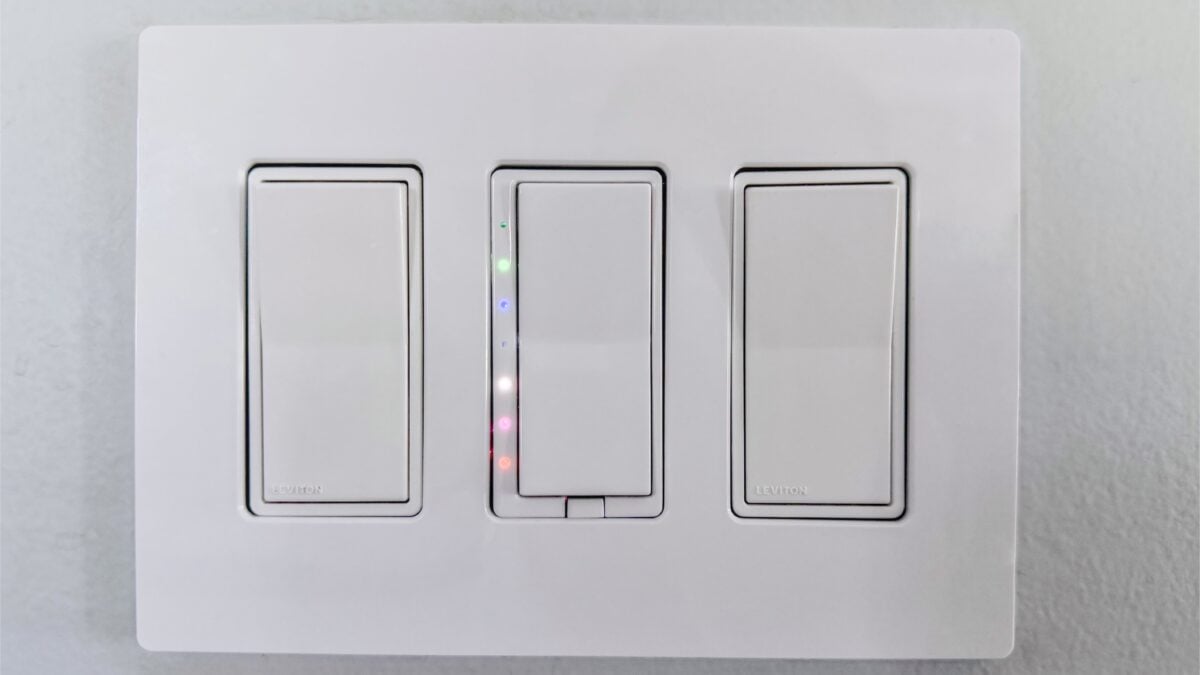
[A] listener pointed me to these now-discontinued HomeSeer switches. At a glance, this a standard Decora-style dimmer that can be controlled via ZWave. However, upon closer inspection, there are seven LEDs on the left-hand side. Even more interestingly, you can put the switch in “status mode”, which means each of the LEDs can be individually controlled.

[…]

The center switch actually controls the lights above our kitchen table. But for me, it’s the home status board. Here’s what each of the lights indicates, from top to bottom:

LED Color Purpose
None Not currently used
Green The laundry needs attention
Blue The mail is waiting
None Not currently used
White The Volvo is charging
Magenta The shed door is open
Red The garage door is open

The steady/all-good state of the status board is for all of the LEDs to be extinguished. If any of them is on, it doesn’t necessarily mean that something needs attention, but it may.

What a cool idea – I’m curious if Casey could add a Home Automation based on this Accessory that sets a Scene or sends an alert when all five are achieved.

View the original.


Posts You Might Like

Jason Snell: Shortcuts Is Not Really That Friendly
When discussing a demo of Misty Studio on the M5 MacBook Pro, Jason Snell compared it to Shortcuts as similarly friendly-but-unfriendly tool – a fair criticism.
Apple releases new Final Cut Camera app, plus smart updates to Final Cut Pro for iPad and Mac »
Apple has released a new Final Cut Camera app to tie in with Live Multicam in Final Cut Pro 2 for iPad – and the Mac version has new smart features as well.
13 Easy YouTube Shortcuts for Creators and Viewers »
From Stephen Robles on YouTube: Stephen’s set of YouTube shortcuts are great, taking advantage of YouTube’s web URL to redirect across the app. Plus, the RSS feed ones go even further for creators.
Here’s how to automate iPhone’s always-on display (with Shortcuts) »
9to5Mac has a quick guide on automating the Always On Display for iPhone using Focus modes, the Shortcuts action, and—my addition—Automations.