Ulysses Adds Action Button & Control Center Shortcuts Alongside Table of Contents & Writing Tools »

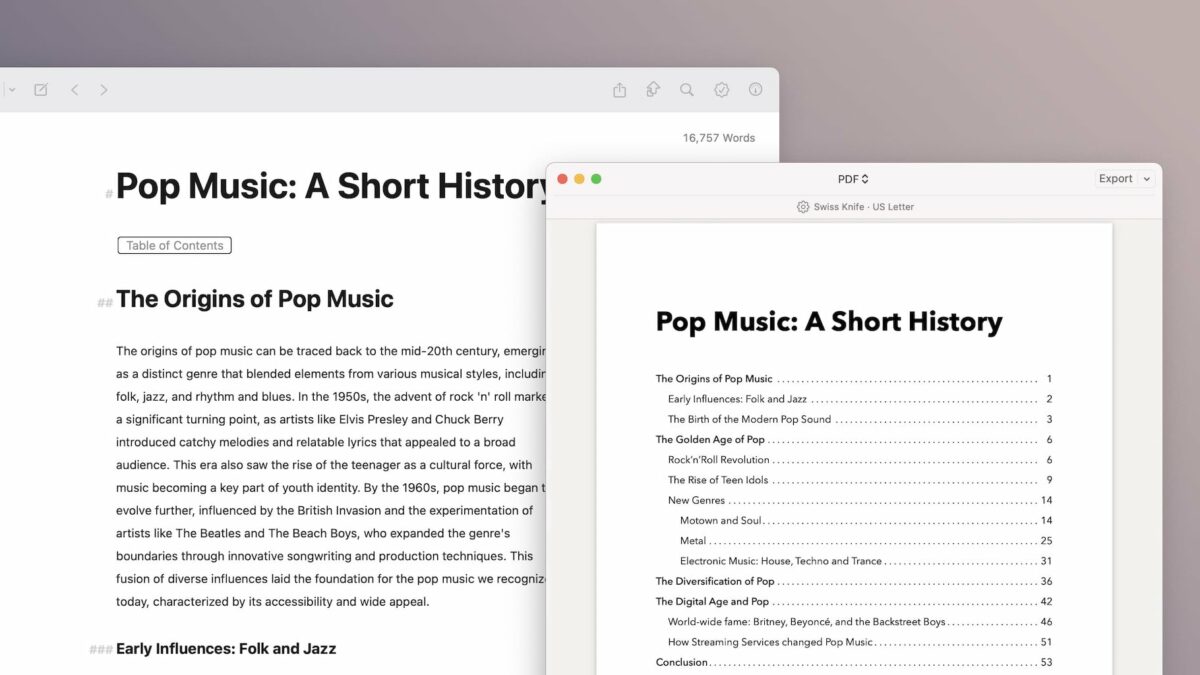
In the latest release, Ulysses has expanded their Shortcuts support with new Action button and Control Center functions – plus a Table of Contents feature and support for Writing Tools from Apple Intelligence.

From Ulysses’ v36 release notes:

  • You can now launch Ulysses from the Action button found on the latest iPhone models.
  • “New Sheet” will launch Ulysses into a new, empty sheet in your Inbox.
  • “Last sheet” will open the last edited sheet.
  • “Search” will launch Ulysses directly into Quick Open.
  • These actions are also available via Control Center on iOS 18.1.

Very excited to see these new actions – I got a chance to talk with the Ulysses team at NSSpain and have been eagerly anticipating these.

These actions join the new Table of Contents feature and updates to support Apple Intelligence Writing Tools.

View the Release Notes on Ulysses’s site.

Posts You Might Like

Six livestreams around Siri Shortcuts to watch
Customize Threads With These 8 Alternate Home Screen Icons
Get these 8 excellent alternate icons and use them with Add to Home Screen for your own personal Threads experience.
How to change back to the old Twitter app icon on iOS »
With Twitter being rebranded to X, users are looking for ways to avoid the change and get the old icon back – using Add to Home Screen in Shortcuts.