Why the Menu Bar is the best way to get started with Shortcuts for Mac

Shortcuts for Mac lets you run shortcuts from the Menu Bar. Here's how to set it up, optimize your shortcuts, and add advanced interactivity for your macOS experience.

Yours truly for iMore:

Part of the core macOS experience is interacting with the Menu Bar, whether it’s choosing from the current app’s specific commands from the top left or using Menu Bar apps that sit at the top right of your screen all day long.

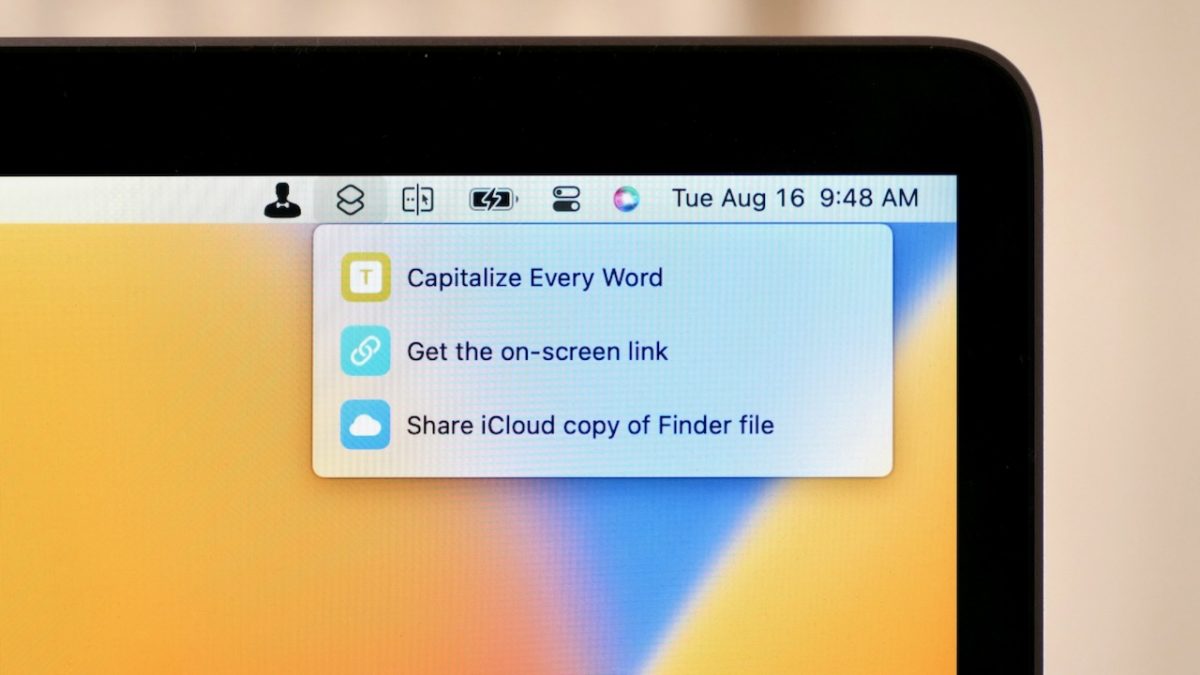
That’s why it’s fantastic that Apple released Shortcuts for Mac with Menu Bar support, showing a small Shortcuts icon that can be clicked to reveal a list of assigned shortcuts.

This small spot is perhaps one of the best to place the most-important shortcuts you use on a daily basis from your Mac, giving you quick access to running them, editing them, and even working interactively with what you currently have open on-screen:

Read the full story on iMore.

Posts You Might Like

New in the Shortcuts Library: Comixology from Amazon shortcuts
Here's my new set of shortcuts for comics readers – a folder for Comixology from Amazon, which is most accessible on the Kindle website.
New in the Shortcuts Library: Apple News+ Food shortcuts
New in iOS 18.4, Apple News+ get access to a special Food category – here’s a set of shortcuts to access all its sections.
New in the Shortcuts Library: Waveform podcast shortcuts
If you're a fan of the Waveform podcast from MKBHD & team, check out these shortcuts for interacting with the show, the YouTube Playlist, the clips channel, and the main channel.
Apple Adds Restore Setting for “Shortcuts On This Device That Aren’t Currently In Your Library”
For shortcuts stuck in sync, Apple has added a new Restore button that adds your shortcuts back to your library.

Was this useful?