Ulysses, my blogging app of choice, has updated to version 39 with the following changes:
- Liquid Glass support
- Menus reworked
- Revision Mode is just another tab
- Editor Focus is now “Hide Interface”
- Swipe Gestures
- Swipe Actions
- Improved keyboard navigation
- Share/import projects
- Copy for Substack and Basecamp
- Theming
- App Intents
- Other improvements
- Buxgfixes
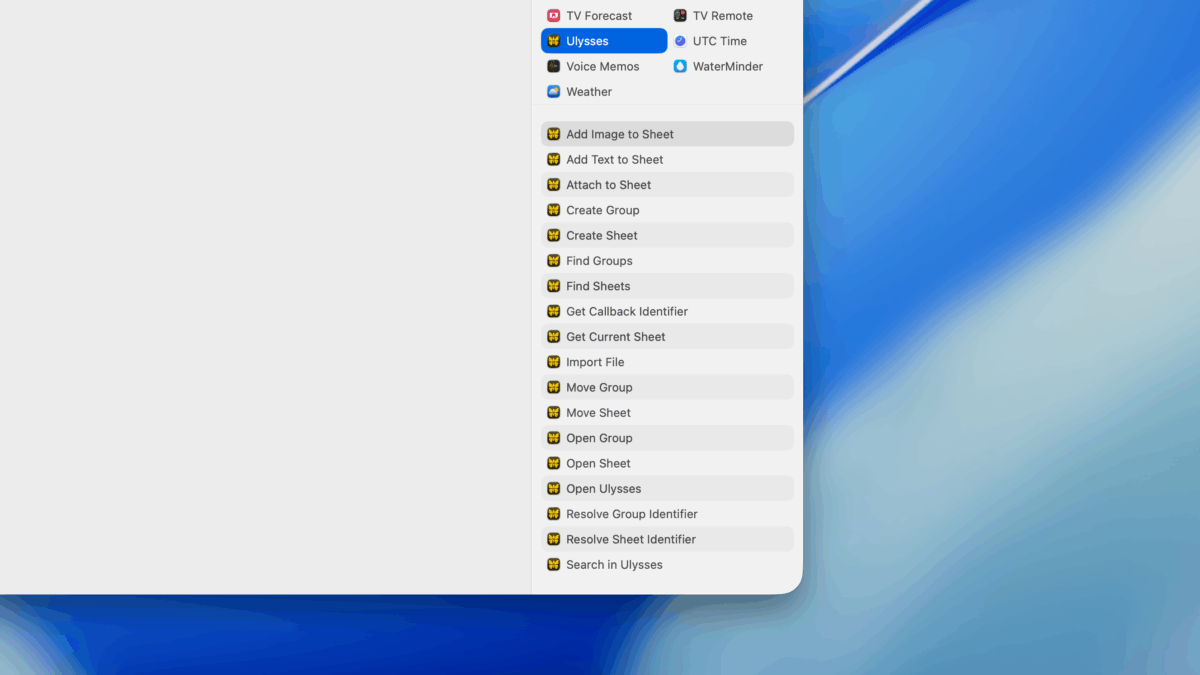
Naturally, I want to highlight the section on their new Shortcuts actions and Spotlight for Mac support in particular:
App Intents
We revamped our integration with Spotlight and the Shortcuts app. On macOS 26, actions can now be triggered directly from Spotlight. New actions include:
“Find Sheet” and “Find Group”, with configurable filters.
“Import File”, to convert any given text file into a sheet.
“Search in Ulysses”, to open the in-app search with a pre-defined search term.
Also:
Copy for Substack and Basecamp
You can now copy your texts for use on Substack and Basecamp.
Most formatting is supported; some limitations apply (images won’t work).
On Substack, we even support buttons (via raw source) and Spotify previews (via text links).
This will be good for my newsletter, which I don’t want to write within the Substack browser – I prefer a dedicated editor experience like Ulysses.
Check out the full page of Release Notes for Ulysses and get Ulysses from the App Store.