Categories
Apps Links

Detail: A Modern, Machine Learning-Powered Approach to Video »

John Voorhees for MacStories (line breaks added for emphasis):

The sources above are the component parts of what Detail calls Scenes, which can use one or more sources to create a single-view Scene or a Combo Scene that comes in five different layouts.

That allows you to mix and match camera sources with screen-sharing sources and even other scenes into one composite video.

The result is a flexible system that can be easily adapted for video interviews, tutorials and help documentation, video conferencing apps like Zoom, and more.

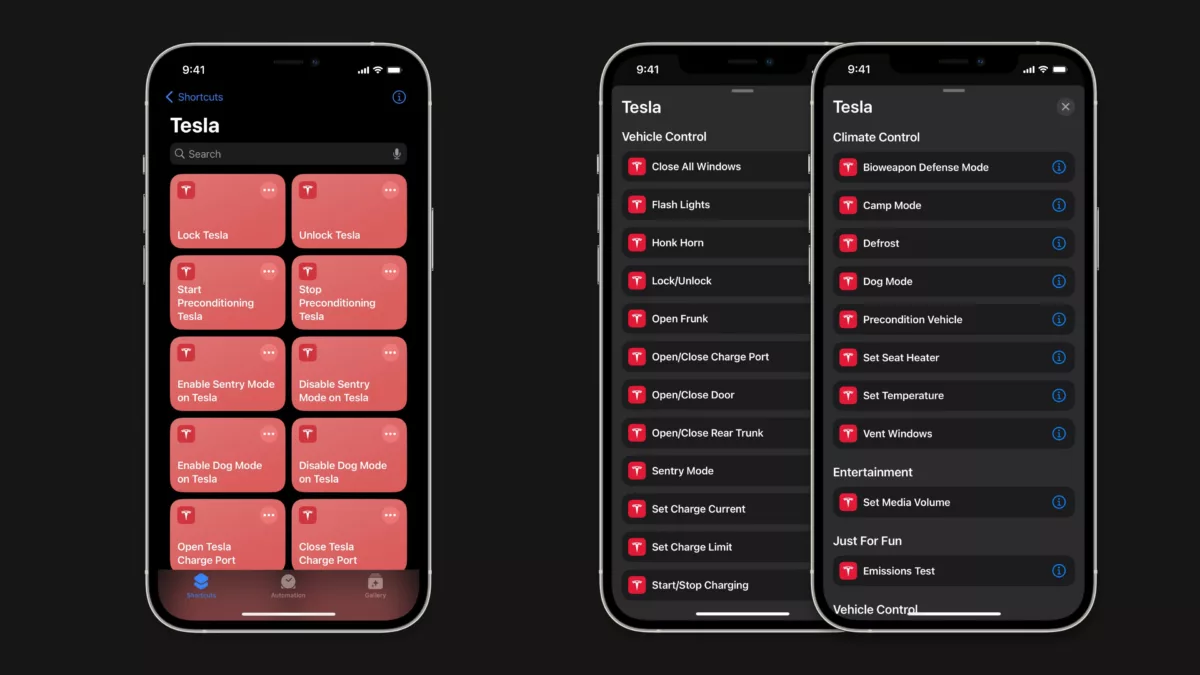
Moreover, you can set up multiple scenes in advance and switch among them using keyboard shortcuts or Apple’s Shortcuts app.

I’ve had my eye on Detail for Mac for some time, and their latest Detail Duo for iPhone/iPad is intriguing too. Over on Mastodon, John and I had this back-and-forth about the update:

Categories
Apps Links

Portal’s Mac app helps users focus with immersive backgrounds and audio »

Ivan Mehta writing for TechCrunch:

Productivity-enhancing app Portal has launched a Mac app. The company helps users regain focus and become more productive with immersive backgrounds and natural sounds.[…] Portal for Mac has more than 80 environments to choose from, which include high-quality looping videos captured by the company’s own team.

Further on:

Users can control the sound and motion or change the background through the menu bar icon too. Given that Portal is a native Mac app, it integrates with Siri Shortcuts as well.

I’m a huge fan of apps like Endel for its generative audio soundscapes – Portal looks like an interesting visual version of the same concept.

View the full story on TechCrunch.

Categories
Apps Links

Track time in the Dynamic Island with Timery’s updated Shortcuts actions

@Timery on Mastodon:

Timery 1.5.3 is available! This update has four new Shortcuts actions and several small improvements & fixes!

https://apps.apple.com/us/app/id1425368544

What’s new in Shortcuts:
• Start Recent Timer
• Find Recent Timers
• Export Saved Report
• Start Live Activity

What else is new:
• Improvements to reordering saved timers
• Easier-to-tap time-adjustment buttons
• More project colors for paid Toggl accounts
• Fix for exporting reports on Mac
• VoiceOver improvements

Here are some more details […]:

Developer Joe Hribar of Timery has revamped some of the Shortcuts actions for his app to activate the Live Activities feature, which begins a timer in the Dynamic Island if you have an iPhone 14 Pro – neat. ?

Check out the thread for more on the update and get Timery on the App Store.

Categories
Apps Games

No Man’s Sky for Mac now available; no iPad yet

@NoMansSky/Sean Murray on Twitter this morning:

No Man’s Sky Mac ?

?Cross Play
?Cross Save
?Metal 3
?High Performance
?‍?Apple Silicon and Intel
?MetalFX Temporal & Spatial Upscaling
?Optimised Loading
?️Full Controller Support
?7 years of updates

Free to millions of existing Steam Players

https://store.steampowered.com/app/275850/No\_Mans\_Sky/

From Apple’s press release last year:

The power of Apple silicon enables every new Mac to run AAA games with ease, including upcoming titles such as EA’s GRID Legends and Capcom’s Resident Evil Village.
[…]
And since Apple silicon also powers iPad, game developers can bring their AAA games to even more users, like No Man’s Sky from Hello Games, which is coming to both Mac and iPad later this year.

After being delayed, the Mac version of No Man’s Sky from developer Hello Games launched today.

Despite only having played a bit on Xbox, I’m looking forward to diving in with cross-play support once it rolls out to iPad (and any other platforms) – this is one of the first AAA games for Apple devices that I care about and seems a perfect launch title for a top-tier gaming experience outside the confines of my console setup.

Get No Man’s Sky on Steam ($59.99 new, free if already purchased on Steam for another platform).1


  1. The lack of a Mac App Store release is interesting, especially given the relationship with Apple.

    No Man’s Sky has also been tweeting some very telling teasers ahead of WWDC, which I am having fun theorizing about on Mastodon

Categories
Apps Links

Elsewhen: Time zones, translated »

Zach Knox, replying to my post about Discord timestamps:

I would also highly recommend Elsewhen, which has a shortcuts action to do exactly that apps.apple.com/us/app/elsewhen… (though of course learning how those timestamps work is still quite valuable!)

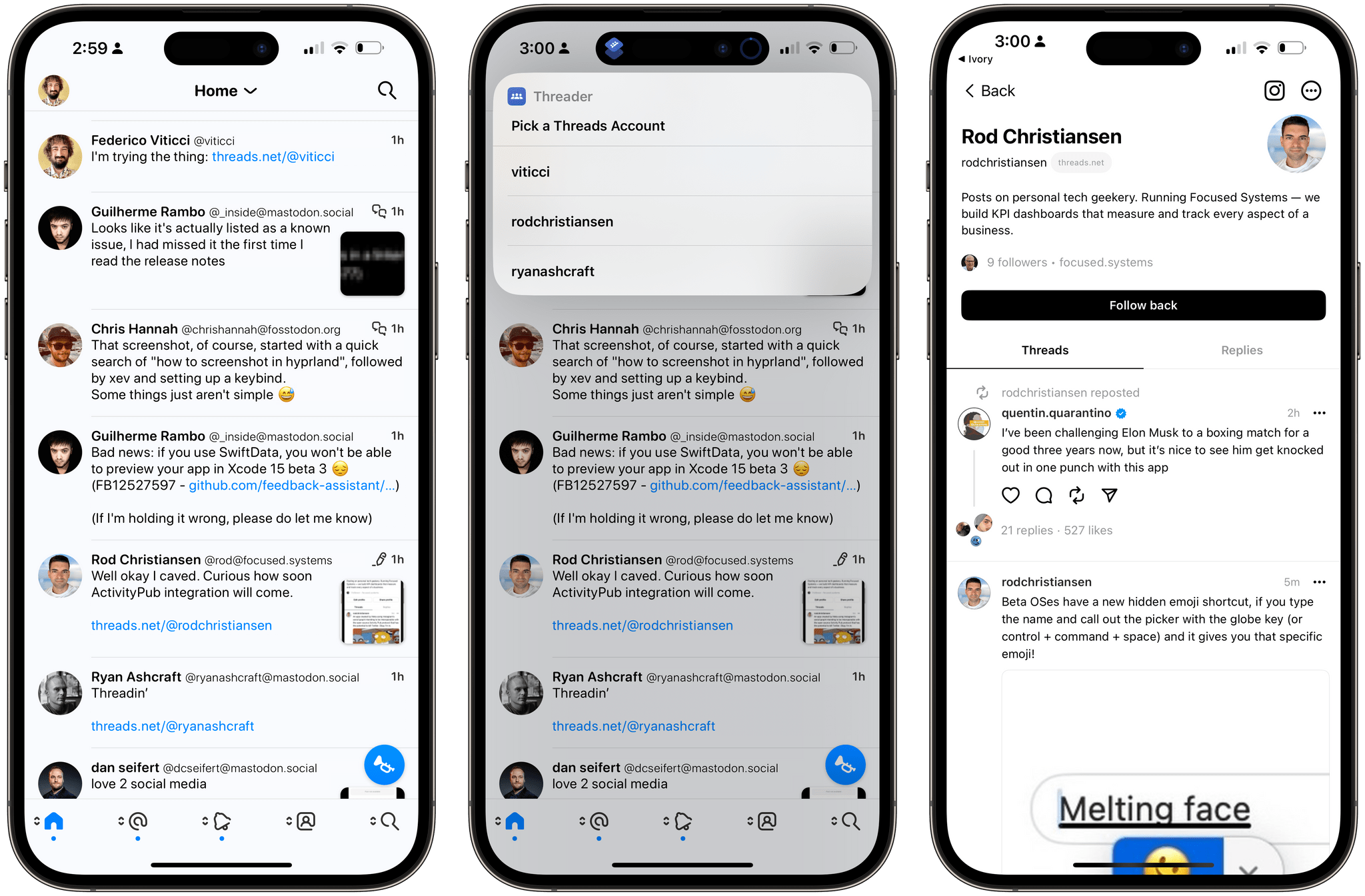
Zach is totally right, I’d forgotten about Elsewhen for Mac, iPad, and iPhone – a handy utility from developer Benjamin Cardy that shows a visual representation of the Discord timestamp formats.

Plus, Elsewhen includes another great feature for actually laying out alternate timezones for specific countries, for making announcement posts like I do with my streams:

Categories
Apps Custom Shortcuts Links

Zenitizer, a clean and simple meditation timer »

@Zenitizer on Mastodon:

Dear Fediverse ? Zenitizer launched on the App Store today ??

? Clean & Simple Meditation Timer
? Soothing Sounds
❤️ Apple Health Support
? Siri & Shortcuts Support
⭐️ Goals and Streaks
? Glanceable Widgets and Apple Watch Complications

1️⃣ Download: zenitizer.app/install

Congrats to developer Manuel Kehl on his launch last Thursday. ?

Get Zenitizer on the App Store.

Categories
Apps Custom Shortcuts Links

Shortcut to redirect YouTube links into the iOS app »

Stephen Robles of AppleInsider shared a shortcut for redirecting YouTube links into the app:

The shortcut works by replacing the https with youtube – using Stephen’s own YouTube channel URL as an example, it’d appear like youtube://www.youtube.com/@beardfm.

Time to add this to my YouTube collection 🙂

Get the Watch In YouTube shortcut from Stephen’s tweet.

Categories
Apps Custom Shortcuts

Making a simple Menu Bar applet to replace Shortcuts’ progress meter

Yesterday on Six Colors, Jason Snell wrote a post called Create visual feedback for running Shortcuts about a method he’s using to check his progress in a long-running shortcut using a Menu Bar utility.

His post was born out of frustration with the Shortcuts menu bar applet, which we discussed on Mastodon as being somewhat unobvious as a signal for progression:

Earlier today, I was complaining to Shortcuts expert Matthew Cassinelli about how there’s no really good way to view progress of a running Shortcut on macOS. Yes, the Shortcuts menu item in the menu bar sort of tries to display progress, but… it doesn’t provide any information I find particularly valuable.

I’m frustrated because I do have some Shortcuts that take time to run, yet unless I have them beep or display a notification when they reach a certain point in the process, I have no idea what they’re doing or if they’re even working.

If you didn’t know, the Shortcuts menu bar icon changes while a shortcut is running to indicate progression.

Categories
Apps News

Apple adds Shortcuts for Mac support to Pages, Numbers, Keynote

Today, Apple released updates to their iWork suite of apps that adds actions in Shortcuts for Pages, Numbers, and Keynote on macOS, bringing powerful first-party actions that Mac users can take advantage to automate their work:

New First-Party Actions

Across all three iWork apps, there are now actions for “Open” and “Create” – plus Numbers has added “Add Row to Top or Bottom of Table” and Keynote has added “Open in Rehearsal Mode” and “Open in Show Mode.”

The Create actions all also include the templates/themes available in the iWork apps, which makes it quick to generate 40+ samples from Pages, Numbers, and Keynote each for a total of over 120+ templates.

Here’s the full list of actions:

Categories
Apps Links Offsite Video

Walking through the Home app (with Joey Banks)

On Thursday March 25, I streamed with my designer friend Joey Banks and walked him through some of the oddities of the Home app, working on scenes, grouping devices, and HomeKit automations:

https://www.youtube.com/watch?v=Ie5DZ_p_6F4

Catch the replay on YouTube – and add my livestream calendar to tune into future streams.

Categories
Apps Links

Transit’s Apple Watch app returns after two-year hiatus

Jon Fingas, writing for Endgaget about Transit for iOS releasing a new version of their Apple Watch app:

The popular public transportation tool is now a native app, of course, but it also gives you considerably more detail than just arrival times, including future arrivals and a map indicating where to go. 

I’m glad to see more apps slowly returning to the Apple Watch (or adopting it for the first time). Will be trying this out over the weekend ?.

Read the full article.

Categories
Apps

New DuetCam app shoots video with both cameras at once

Today, as first noticed by 9to5Mac, developer Marcel Schmitz launched a brand new app called DuetCam for $2.99 that takes advantage of iOS 13’s ability to record video with both the front-facing camera and one of the back cameras at the same time.

Schmitz’ app basically lets you film what’s in front of you while also recording yourself in a smaller picture-in-picture box, creating an immersive experience where you can talk to the camera while showing what you’re looking at.

Categories
Apps Links Tips & Tricks

Audible update lets you use credits to buy books in iOS app

In the latest app update on iOS, Audible now lets users actually buy audiobooks inside the app using existing credits.

According to a tweet from Chris Fralic of First Round (originally sourced by Joshua Topolosky of The Outline), the “Add to Library” button in Audible will show the message “You can now use credits without leaving the app!”:

Categories
Apps Links Tips & Tricks

“Make your Mac dance” with MacSparky’s Keyboard Maestro Field Guide

Yesterday, David Sparks released the Keyboard Maestro Field Guide, the seventh paid course offered through his Learn MacSparky site1. This 4-hour block of videos covers 76 different screencasts about Keyboard Maestro, the Mac automation application that provides significantly deep capabilities and makes them available to use across your Apple desktop or laptop.

As usual, David’s course is well-paced, insightful, and makes it easy to learn complex topics like Keyboard Maestro’s slightly esoteric design language.

Categories
Apps

Reeder is back and better than ever (my new favorite RSS app)

Want to read this in iBooks? Get an ePub of this article here and use this shortcut to extract from the .zip.

iPad users who have been holding out hope for an update to Reeder for iOS can relax – a new version was released today with full support for all devices on all platforms and some interesting new features.

See, previously, Reeder 3 wasn’t updated for the new iPad Pro models – after 7 months without proper support in sight, many iOS power users like me sought out new RSS readers. And while apparently Reeder 3 had resolved layout issues a month ago, I had honestly already deleted it since it didn’t work on half my devices.

But that all changes today with the latest release of Reeder 4.

Reeder 4 for iPad Pro 12.9″ in both Light and Dark modes.

Available as a new purchase costing $4.99 on the App Store and $9.99 on the Mac App Store, bringing with it a refreshed design, some unique reading features, and a unified code base across iOS and Mac that will make it easier to update in the future.

I bought the app as soon as I heard about it this morning – here’s why I think my money was well-spent.

Table of contents

  • Why I like Reeder
    • The Many Views of Reeder
    • Styling
    • Customization and control
  • New features
    • Redesigned
    • Bionic Reading
    • Instapaper Tags
    • Read Later
  • Small changes
  • Keyboard shortcuts adjustments
  • Ideas for expansion
  • Conclusion
Categories
Apps

Apple News has a notification spam problem

Lately, I’ve been diving deeper into Apple News – thanks to the recent addition of Apple News+ magazines, along with the recently-added “Open In Apple News” share sheet extension, it’s been my go-to source for a quick news digest, some longer reads, and now feature stories as well.

Plus, I’ve been using my old iPad Mini 2 to consume the news as a more focused and intentional usage of my devices, almost only ever using it for News and Books.

About three weeks ago I read Digital Minimalism, but then hadn’t touched the iPad Mini since (I just read News on my other devices). But when I picked up the device again to read How To Bored over this last weekend, I was met with this on the screen:

Page after page of Apple News notifications, all from sources I barely actually read and who were attempting to grab my attention every 15-30 minutes – my Apple News account was spamming me.

Categories
Apps

CalZones is the only scheduling app you need to plan across timezones

Developer David Smith has released a new app today called CalZones that is a combination calendar and timezone converter.

Available for $4.99 via the App Store for iPhone, iPad, and Apple Watch, the app makes it as easy as possible to see what time it is where somebody else lives and arrange a meeting at the correct time across timezones and work schedules.

I’ve never found a calendar app that lets me have timezones presets visualized so easily, giving me the correct the information of what time it is across the world, and packing an impressive amount of utility into multiple small spaces.

Here’s how Calzone accomplishes all that.

Categories
Apps Tips & Tricks

How to make a full-page screenshot of an app or website with StitchPics

With the sharing feature that was in Workflow not being available in Shortcuts1, many people are resorting to sharing screenshots to show people how their shortcuts work.

Oddly, this has had a great benefit for the fledgling community – shortcuts are very visual, and a bunch of hyperlinks links on Twitter might not have had the same effect as a good photoset2:

But longer shortcuts with more than a handful of actions can’t fit onto one screen, so users have to resort to more creative options.

StitchPics

My recommendation is StitchPics, a simple but very functional app to combine photos that’s free with a $1.99 in-app purchase to add more than 8 images3.

Made by a Chinese developer, the app isn’t fully translated, the logo is somewhat inexplicably an L, and on iPad it only works in portrait orientation.

That being said, I’m definitely glad I bought it. That’s because, beyond basic auto-stitching, StitchPics has a fantastic pinch-based method of combing images that’s super reliable for getting things exactly right.

Here’s a quick example:

[videopress 6TEyzPrb]

Once it takes a guess at how to put your images together, you can slide either image up or down behind the crossover point and collapse parts you want to be hidden.

Especially with longer shortcuts where you may need to take many screenshots, it makes aligning the different actions much easier.

StitchPics is also great for getting images of complete webpages on mobile – just take screenshots as you scroll and stitch them together in the app.

Tailor

A popular alternative is Tailor, but historically I’ve found it is unreliable at parsing multiple screenshots from Workflow (and the same is true for Shortcuts). The actions just look too similar across many images and it doesn’t know how to handle it.

Tailor is also free (but with a watermark removable by in-app purchase) and should work fine for simpler shortcuts. However, it is only available for iPhone.

That’s why I’ve been using StitchPics – it ain’t pretty, but it gets the job done, and a bit better, on both my devices.

Get StitchPics on the App Store.

Click here to check out more Tips & Tricks posts

Links in this post


  1. I don’t know if it’s temporarily removed or gone for good, but boy am I hoping for the former not the latter. 
  2. Awesome work Ben! And also wow, almost 7,000 people liked a good automation joke (even if it’s mostly for the Harry Potter). 
  3. Plus you can add your own watermarks, change it to a custom size, cut off the top or bottom, leave blank spaces, or change the color of the fonts in the app. 
Categories
Apps Shortcuts

Keeping a better film watchlist in Letterboxd

Lately, when I’m ready to sit down and enjoy something for the evening, I’ve struggled to find the right movie to watch.

It’s way too easy to quickly pick whatever’s available on Netflix, Hulu, or HBO, but really all you’re shown is what they’ve purchased movie rights for. The TV app and iTunes on Apple TV are somewhat helpful, but you can’t go very deep into the catalog of films available when you’re just browsing.

So I’ve been trying to use Letterboxd to keep track of movies and build up a better list to pick from when it’s time to watch. The iOS app is designed for finding films, saving them for later, and logging reviews, wrapped up in a mini social network.1

Letterboxd is nice enough for a dedicated app just for movies – the features you’d want here are different from a TV-tracking app like Couchy, which is more designed for keeping up (because you don’t usually review episodes).

Thankfully, Letterboxd added automation support last year along with the release of their iPad version. They have documentation for their URL scheme available, so I took a look and put together a shortcut to help me get started tracking movies to watch.

Categories
Apps Shortcuts

How I Lost My iPad

This last week, I published two posts – one post on The Sweet Setup and one on my website.

Over on The Sweet Setup, I shared “Losing my iPad Pro: what I missed (and love) about Apple’s tablet experience” where I talked about replacing my iPad after it was stolen and how it clarified the space in my experience the device fills for me:

The iPad has been my main computing device since the Pro line came out. Being without it for a few weeks has really highlighted why I prefer the iPad, and in many cases, has shown me how I can do more than on any other device.

Without an iPad, the joy of using a device doesn’t exist to the same extent. I still have an iMac, but since I lost the iPad and have had to use the iMac full-time again, I’m starting to feel the desktop’s limitations.