Welcome to Issue 9 of “What’s New in Shortcuts?”
Hello all – hope you had an excellent weekend too! ?
I’ve got lots of fun Shortcuts goodness coming soon, so until then let’s jump right in:
Welcome to Issue 9 of “What’s New in Shortcuts?”
Hello all – hope you had an excellent weekend too! ?
I’ve got lots of fun Shortcuts goodness coming soon, so until then let’s jump right in:
Welcome to Issue 8 of “What’s New in Shortcuts?”
Hello folks – good news!
With iOS 14.2 nearing release, Shortcuts Sync seems to be back in working order and my library is fully intact again – let me know if you’re still having any issues on the betas.
Otherwise, I’ve spent over a week now using an external monitor with my iPad Pro—specifically with Shortcuts a lot—and I’m loving it, even despite the 4:3 aspect ratio and constant screen mirroring.
The ergonomics are way better, I’ve got my shortcuts on a screen larger than 12.9”, and my iPad Pro has never felt more like a desktop computer.
I’m completing a full office makeover right now, so no photos yet, but until then here’s what’s new with Shortcuts this week:
Welcome to Issue 7 of “What’s New in Shortcuts?”
This week we saw iPhones shipping, I held a few Shortcuts Live streams, and my Home Screen system is almost fully operational.

This week I’m settling into some new office gear I got after talking to Matt Galligan about ergonomics—I’m excited (and comfy)—so expect some impressions of using an iPad with a monitor next weekend.
Until then, here’s what’s new with Shortcuts from this week:
Welcome to Issue 6 of “What’s New in Shortcuts?”
This week, I spent a lot of effort furthering my Home Screens – and I think I got to a pretty good place to write things up soon.
I also spent my time researching Shortcuts for Mac, building out Apple TV shortcuts, and working ahead on some new guides for the future.
Otherwise, there’s lot’s to share this week – let’s dig in:
Welcome to Issue 6 of “What’s New in Shortcuts?”
I’ve kicked off streams for Shortcuts Live again, starting with an unannounced one this past Sunday afternoon – which ended up including my cat Oliver as a guest.

Make sure to follow me on Twitch if you’re interested in tuning in – I’ll be mostly streaming there instead of YouTube to keep the feeds separate (but look for new videos soon).
Otherwise, here’s what’s new in Shortcuts this week:
Welcome to Issue 5 of “What’s New in Shortcuts?”
It’s time for another Apple event… did you see the collection of Apple Event shortcuts from Issue 1? Check it out in the online archive of past issues for this newsletter.
Otherwise, here’s what’s new this week and what’s coming ahead:
Welcome to Issue 4 of “What’s New in Shortcuts?”
Since iOS 14 dropped, I’ve completely changed my Home Screens, Apple Watch faces, and Shortcuts folders – why not a new office layout too? When everything is in flux, sometimes it’s just nice to control your own space…

Gotta love that UltraWide lens for room shots.
Here’s what’s new in Shortcuts this week – new issues coming every Sunday going forward!
Welcome to Issue 3 of “What’s New in Shortcuts?”
Home Screen customization is the biggest trend now that iOS 14 has been out – it started with widgets but, funnily enough, went full-steam ahead thanks to Shortcuts’ Add to Home Screen feature.

From my Twitter – What a shame I never made a video out of this…
Let’s look at some ways you can approach your new Home Screen setup with Shortcuts in mind today:
Welcome to Issue 2 of “What’s New in Shortcuts?”
iOS 14, iPad OS 14, and watchOS 7 are finally here!

There’s so much new, let’s get into it right away:
Jump straight to the Catalog or sign up for a membership.
It’s finally here!
Apple has released iOS 14, iPadOS 14, and watchOS 7 to users around the world – and that means everyone who updates will have the newest version of Siri Shortcuts installed.
Alongside today’s updates, I’m releasing the following:
Let me explain it a bit before you dive into everything.
Thanks to everything new in version 4 of the Shortcuts app, everyone can expect another leap in the automation potential of their Apple products:
My goal as an independent creator has always been to share all the knowledge I’ve learned about Shortcuts and make it free.
That’s because the Shortcuts app is free on Apple’s devices – I’ve always wanted to make sure anyone who doesn’t yet understand it could go online and learn more right away.
That desire is what got me to start my own YouTube channel, plus release my own Shortcuts Library and Action Directory on my website last fall.
But, as I got deeper into iOS 13, I realized I was sharing tons of ideas in my database, but didn’t make them very accessible on the web.
To help people to truly integrate Siri Shortcuts into their lives, I needed something more…
Last week, I had the pleasure of being a guest on episode 4 of Sigmund Judge’s podcast Magic Rays of Light, a new show dedicated to all things Apple TV.
That episode is out now and available to download in your podcast app of choice.
Talking with Sigmund was a treat and we had a great conversation about:
On this episode of Smart Tech Today, Mikah and I talked about Amazon’s new voice-based printer integration, Wink’s recent outage (after the launch of its subscription service), and Apple’s new designed-by-Apple face covering.
Welcome to the first issue of “What’s New in Shortcuts?”
Thank you for reading this newsletter – I look forward to sharing more about how to use Siri Shortcuts so everyone can learn more.
If you haven’t yet, check out the free Shortcuts Catalog with 300 shortcuts and 300 actions, plus the membership available.
With that, here’s what’s new this week:
This free newsletter is designed for anyone interested in learning more about Siri Shortcuts, covering:
* feature updates as they’re discovered,
* interesting ways to use Shortcuts related to topical stories, and
* creative new shortcuts or apps with Shortcuts actions.
In addition, What’s New in Shortcuts acts as a way to subscribe to learn about future updates to my Shortcuts Library, Action Directory, and upcoming additions to the Shortcuts Catalog.
A few weeks ago, I had the honor of being invited back onto Tim Chaten’s podcast iPad Pros to discuss the updates coming to Siri Shortcuts and the Shortcuts app for iPadOS 14.
In the show, Tim asked me a detailed series of questions that covers pretty much every single aspect of what’s new in Shortcuts for iOS 14 on iPhone and iPad.1
Our conversation was so good that the show ended up being split across episode 90 and episode 91! Now that both episodes are out, you can listen to the whole chat and learn about what’s coming next.
On episode 41 of Smart Tech Today, Mikah and I talked about the following:
The Google Assistant has added some new homeschooling features to its smart displays and speakers, including a school bell and random facts delivered throughout the day. Apple and UCLA are working together on a depression study. Mikah and Matthew answer and share a whole host of listener questions and feedback, respectively.
On this episode of Smart Tech Today, Mikah and I talked about industry news as well as headlines around Microsoft, Google, and Amazon – and Mikah’s excellent tech for tracking health data.
Plus, we’re at episode 40! Thank you very much for listening. ?
Links for the show:
The venerable Rene Ritchie was kind enough to invite me back onto his YouTube channel to talk Siri Shortcuts in iOS 14 and everything that’s new:
I always appreciate the opportunity to share about Shortcuts on other people’s channels, and Rene always manages to make me look good.
As I said in the video, make sure to stay tuned for some fun new updates here on my website, as well as for my own upcoming iOS 14 video.
I had the pleasure of being a guest on episode 353 of the Clockwise podcast from Relay FM, joining Brianna Wu, Jason Snell, and Dan Moren for a 30-minute round table discussion of the week’s news.
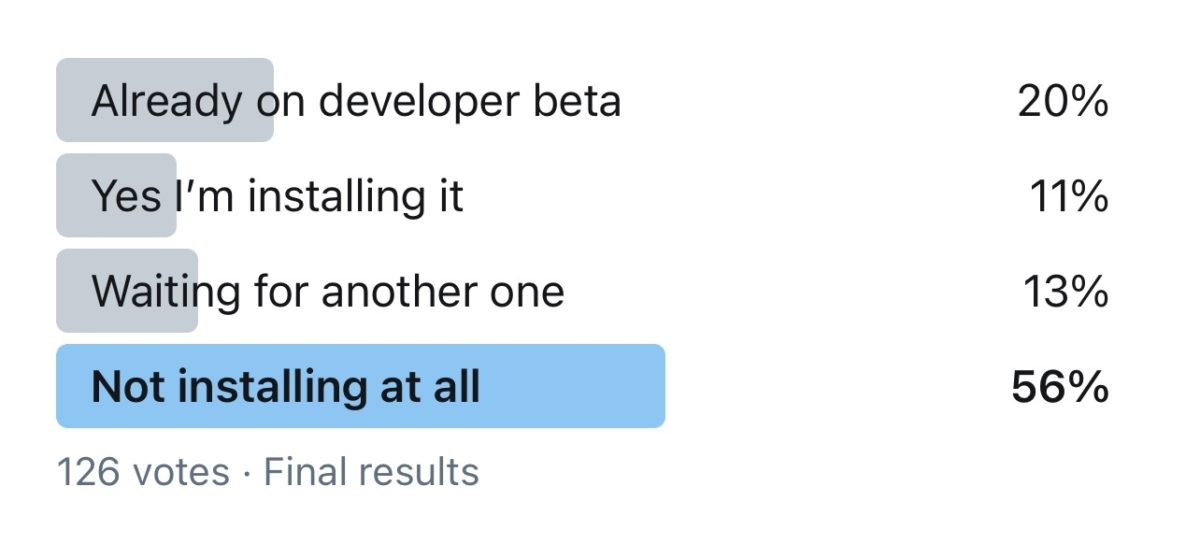
We talked about Apple silicon and what it means for gaming as well as whether we’ll be buying the first round of Macs, our beta-installation strategies, and how to use Shortcuts for public good.
On this episode of Smart Tech Today, Mikah and I talked about: