Categories
Links

New Apple Intelligence Features Are Available Today »

From Apple Newsroom:

Search and Take Action with Updates to Visual Intelligence

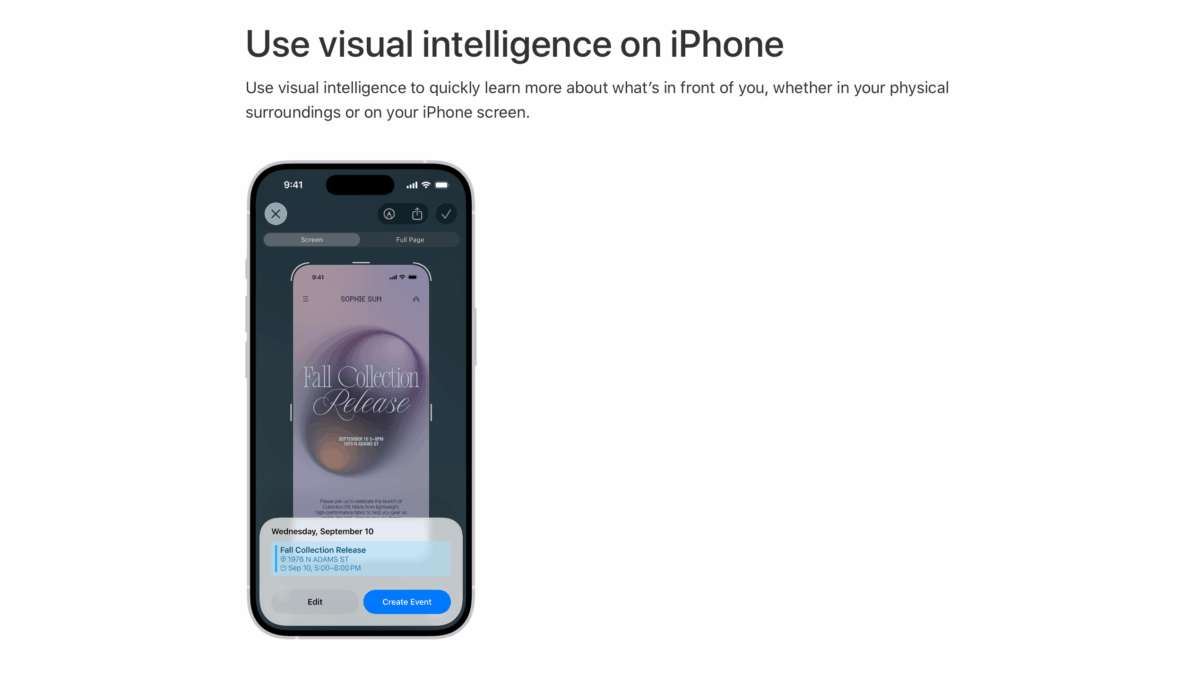
Visual intelligence, which builds on Apple Intelligence, now helps users learn and do more with the content on their iPhone screen. It makes it faster than ever for users to search, take action, and answer questions about the content they’re viewing across their apps.

Users can search for the content on their iPhone screen to find similar images across Google, as well as apps that integrate this experience, such as eBay, Poshmark, Etsy, and more. If there’s an object a user is interested in learning about, like a pair of shoes, they can simply press the same buttons used to take a screenshot and highlight it to search for that specific item or similar objects online. And with ChatGPT, users can ask questions about anything they’re viewing onscreen.

Continue playback of video: Visual Intelligence on iPhone 17 Pro

Updates to visual intelligence help users learn and do more with the content on their iPhone screen.

Visual intelligence enables users to summarize and translate text, as well as add an event from a flyer on their iPhone screen to their calendar, with a single tap.

Users can also take advantage of these capabilities by using visual intelligence with their iPhone camera through Camera Control, the Action button, and in Control Center.

And:

Build Intelligent Shortcuts

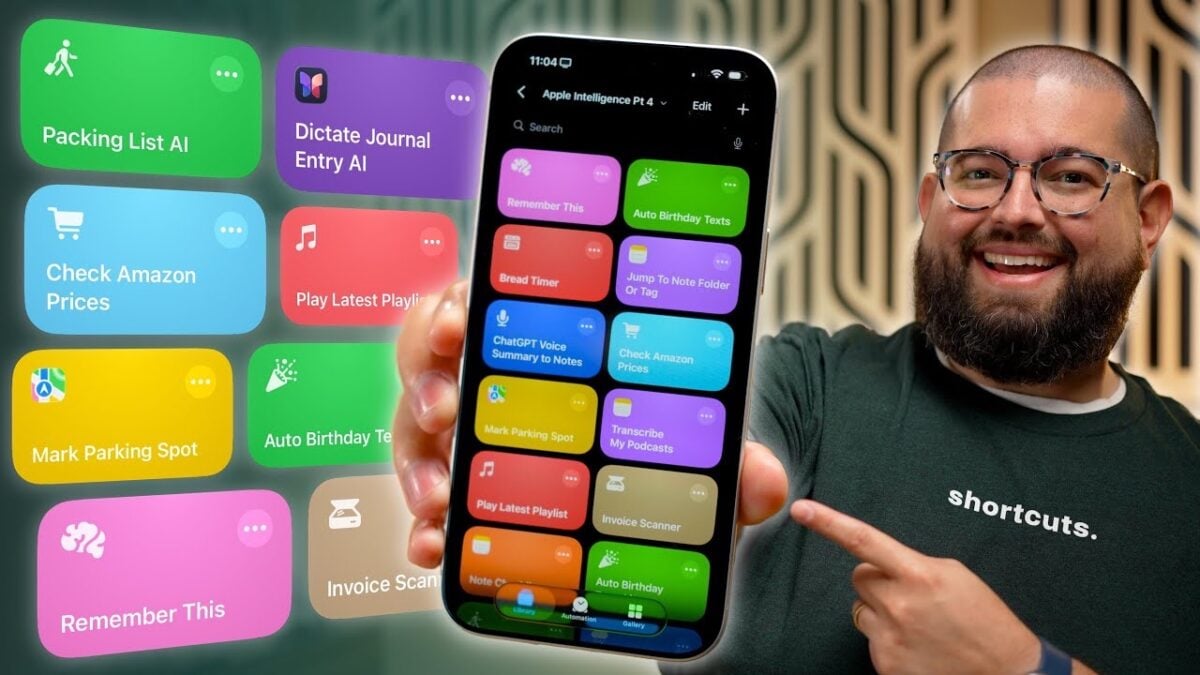
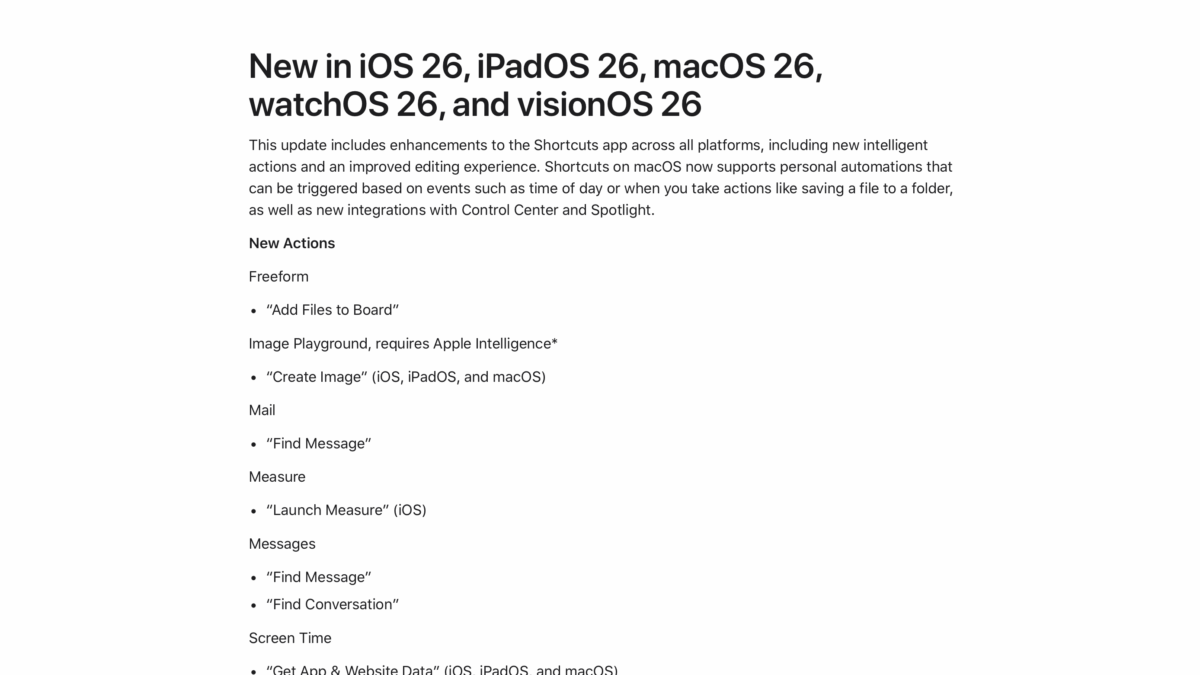
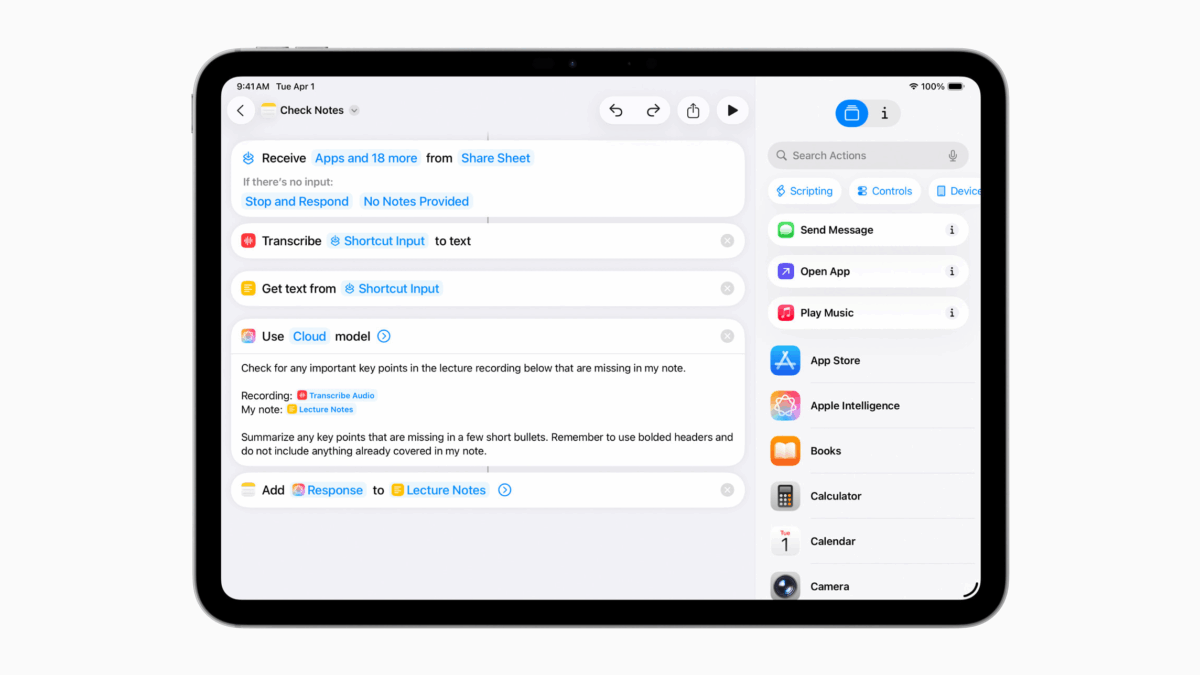
Shortcuts help users accomplish more faster, by combining multiple steps from their favorite apps into powerful, personal automations. And now with Apple Intelligence, users can take advantage of intelligent actions in the Shortcuts app to create automations, like summarizing text with Writing Tools or creating images with Image Playground.

Users can tap into Apple Intelligence models, either on device or with Private Cloud Compute to generate responses that feed into the rest of their shortcut, maintaining the privacy of information used in the shortcut. For example, users can create powerful Shortcuts like comparing an audio transcription to typed notes, summarizing documents by their contents, extracting information from a PDF and adding key details to a spreadsheet, and more.

View the full story from Apple Newsroom.

Categories
Apps Gear Links

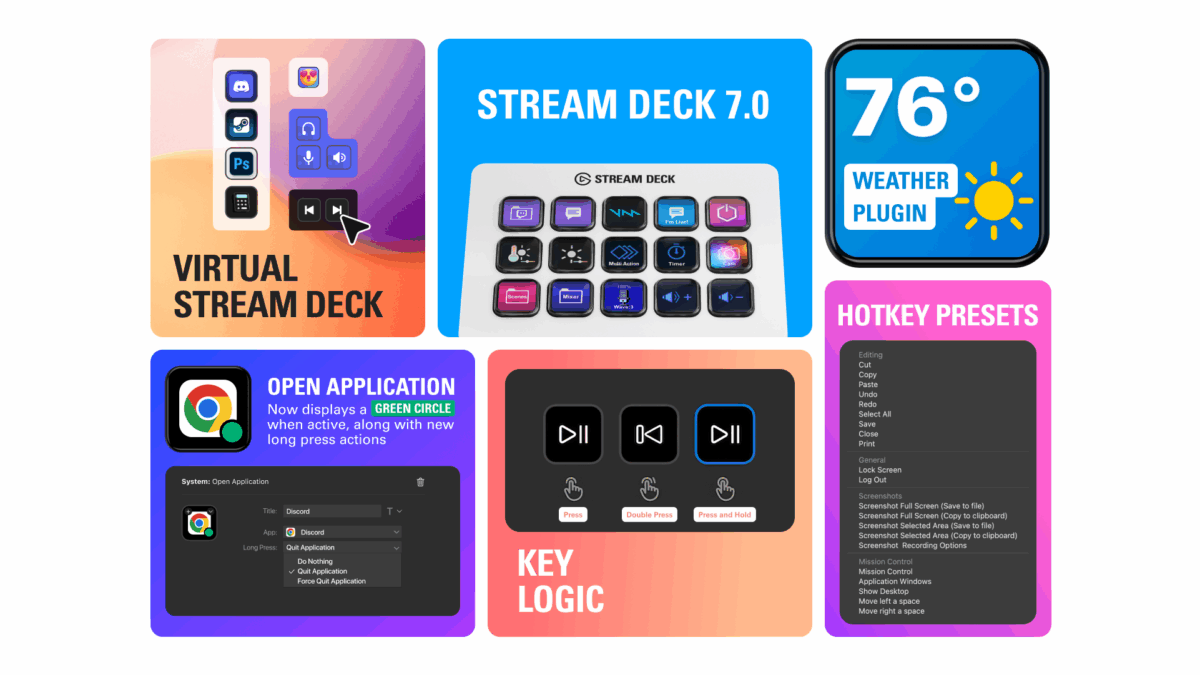
Stream Deck 7 Adds Virtual Decks, Key Logic, Weather, and App Status

My friends at Elgato have updated the Stream Deck app for Mac for version 7.0 with new features for creating virtual Stream Decks on your computer, key logic so each key have multi-tap abilities, weather updates in a new plugin, and quality-of-life features like showing whether an app is currently open.

Here’s how they describe the updates:

🎛️ Virtual Stream Deck — your on-screen workspace controller

Create unlimited virtual keys, customize actions and layouts, then pin them in place or summon to your cursor. It’s your OS sidekick, making every workflow fast and effortless. It’s Stream Deck on your computer, anywhere you go.

[…]

👇 Key Logic — multi-tap abilities

Assign up to three different actions to a single key using Key Logic. Perform a unique action based on how the key is pressed:

  • Press
  • Double press
  • Press and hold

For example, press to play/pause music, double press to skip tracks, or press and hold to go to the previous track.

[…]

⛅ Weather plugin – stay ahead of the forecast

The new Weather Plugin for Stream Deck puts live weather updates and forecasts at your fingertips, with minimal setup and configuration. Instantly see the sky’s latest mood and plan your day without ever picking up your phone or opening a browser.

[…]

🛠️ Improvements and bug fixes

The Open Application action now displays a green dot when the selected app is running.

You can now configure the Open Application action to either do nothing, close, or force quit the selected app when long-pressed.[…]

Virtual Stream Decks are extremely cool.

Check out the Elgato Stream Deck 7.0 Release Notes and get the Stream Deck from Elgato – be sure to sure use my discount code ZZ-CASSINELLI for 5% off.

Categories
Links

Apple News+ introduces Emoji Game 🍎📰➕ 😀🧩

From the Apple Newsroom:

Today, Apple News+ debuted Emoji Game, an original puzzle that challenges subscribers to use emoji to complete short phrases. Emoji Game is now available in English for Apple News+ subscribers in the U.S. and Canada.

“Emoji Game is the perfect addition to the Apple News+ suite of word and number puzzles, turning the emoji we use every day into a brainteaser that’s approachable and fun,” said Lauren Kern, editor-in-chief of Apple News.

More Apple News shortcuts incoming in 3… 2… 1…

View the full story from Apple.


Categories
Developer Links News

Apple Supercharges Its Tools and Technologies for Developers to Foster Creativity, Innovation, and Design »

From Apple’s announcements at WWDC:

App Intents lets developers deeply integrate their app’s actions and content with system experiences across platforms, including Siri, Spotlight, widgets, controls, and more.

This year, App Intents gains support for visual intelligence. This enables apps to provide visual search results within the visual intelligence experience, allowing users to go directly into the app from those results. For instance, Etsy is leveraging visual intelligence to enhance the user experience in its iOS app by facilitating faster and more intuitive discovery of goods and products.

“At Etsy, our job is to seamlessly connect shoppers with creative entrepreneurs around the world who offer extraordinary items — many of which are hard to describe. The ability to meet shoppers right on their iPhone with visual intelligence is a meaningful unlock, and makes it easier than ever for buyers to quickly discover exactly what they’re looking for while directly supporting small businesses,” said Etsy CTO Rafe Colburn.

Read the full post from the Apple Newsroom.

Categories
Gear How To Links

How Fast Should My Internet Be To Stream? »

Elgato has shared a helpful guide for ensuring your internet is fast enough for streaming:

Streaming your content live online is more accessible than ever and also can be equally data hungry. From streaming right from your phone to your followers on TikTok to streaming a professional event in 4K 60fps with High Dynamic Range on YouTube, these all require some amount of bandwidth to get your live content to where it needs to be.

And:

In short, here’s the maximum bitrates supported by the services.

Twitch: 6Mbps (up to 1080p)

YouTube: 40Mbps (Up to 4K)

Also, these are upload speeds – and if you’re using both, it can take even more. I use High Quality Audio and High Quality Video in Ecamm Live, which also add to the network load.

Check out the post from Elgato and get Ecamm Live to stream from your Mac.

Also, be sure to sure use my discount code ZZ-CASSINELLI for 5% off from Elgato.

Categories
Gear How To Links

How To Archive Your Live Stream And Why To Do It »

Elgato has shared a handy guide for making sure you always have a copy of your livestream for later – something that tripped me up when I first started on Twitch:

You just finished a stream full of funny moments, interesting discussion, or a great final stand in a battle royale. But what happened to all that content? Did it just end up in the void or did you make sure to save it for later?

Some streaming services like Twitch.TV have time limits for how long they’ll hold onto your past livestream. If you want those moments to live on, you’ll need to archive them somehow. And in some cases, videos are simply unavailable after the stream due to copyright reasons. If you don’t enable storage of those past streams, it’s been too long, or you listened to some music on stream by accident, those moments could just be history.

If you stream right onto YouTube, and you’re already set as those will automatically be archived as a regular video, as long as you weren’t doing a subathon for over 12 hours. If all you want is for your streams to live on, you’re good to go.

Check out the post from Elgato and follow me on Twitch.

Also, be sure to sure use my discount code ZZ-CASSINELLI for 5% off from Elgato.

Categories
Apps Gear Links

The Stream Deck App Is More Mac-Like in Version 6.9

My friends at Elgato have updated the Stream Deck app for Mac for version 6.9 with new features for launching and closing an app from the same key, paste from clipboard in Text actions, the ability to choose your browser when opening URLs, and quality-of-life improvements specifically to make the app more Mac-like.

Here’s how they describe the updates:

🆕 Open App – From launch to close, all on one key

Launching your favorite apps just got easier. The new Open Application action shows a searchable list of installed programs—no file path hunting required.

And it now works with Windows Store (UWP) apps like Discord, Spotify, and Microsoft Teams.

✨ Pro tip: Press and hold the key to close the app. Quick in, quick out.

[…]

📝 Text Action – Now with Clipboard Paste Mode

The Text action now includes paste mode selection with options for simulating typing or pasting from clipboard. Simulate typing is exactly that—its as if you’re typing the text. Paste from Clipboard is new and text is pasted as if you’ve pressed CTRL/CMD+V. The default mode has been changed to Paste from Clipboard.

Simulate Typing is useful for programs that need inputs, like typing out commands in sim games

Paste from Clipboard is useful for chat applications, when you want to paste a block of text as a single message

[…]

🌐 Website Action – Choose Your Browser

Now you can choose exactly where your Website actions open. Chrome for work, Firefox for dev, Safari for testing—it’s all up to you.

Just pick from your installed browsers in the dropdown. The old “GET request in background” toggle now lives here too, tucked away for power users.

[…]

⬇️ Profiles just got smarter

Importing profiles from Marketplace? Stream Deck 6.9 now helps you hit the ground running. If a profile uses actions from plugins you don’t have, you’ll be prompted to install them automatically—no guesswork, no more question marks.

[…]

🪄 Quality of life improvements

A few small touches make a big difference:

Option to launch Stream Deck on startup

Option to disable automatic update checks

macOS only: Stream Deck now appears in the Dock when open

macOS only: You can now maximize the app using the green button

[…]

Check out the Elgato Stream Deck 6.9 Release Notes and get the Stream Deck from Elgato – be sure to sure use my discount code ZZ-CASSINELLI for 5% off.

Categories
Announcements Developer Links News

Apple Is Delaying the ‘More Personalized Siri’ Apple Intelligence Features »

On Wednesday, March 5, I posted blog post “New developer APIs hint at ‘Personal Context’ for Apple Intelligence coming in iOS 18.4”. Today Friday, March 7, Apple said “Nope” to John Gruber – here’s the quote from Apple spokesperson Jacqueline Roy from his story on Daring Fireball:

“Siri helps our users find what they need and get things done quickly, and in just the past six months, we’ve made Siri more conversational, introduced new features like type to Siri and product knowledge, and added an integration with ChatGPT. We’ve also been working on a more personalized Siri, giving it more awareness of your personal context, as well as the ability to take action for you within and across your apps. It’s going to take us longer than we thought to deliver on these features and we anticipate rolling them out in the coming year.”

Gruber also gives his analysis of the situation, which you should read in full.

Oh, and those API pages? Gone.

View the whole story on Daring Fireball.

Categories
Gear Links News

Apple unveils new Mac Studio, the most powerful Mac ever »

From the Apple Newsroom:

Apple today announced the new Mac Studio, the most powerful Mac ever made, featuring M4 Max and the new M3 Ultra chip. The ultimate pro desktop delivers groundbreaking pro performance, extensive connectivity now with Thunderbolt 5, and new capabilities in its compact and quiet design that can live right on a desk. Mac Studio can tackle the most intense workloads with its powerful CPU, Apple’s advanced graphics architecture, higher unified memory capacity, ultrafast SSD storage, and a faster and more efficient Neural Engine.

My M1 Mac mini from 2020 is also way overdue for an upgrade…

View the original.

Categories
Gear Links News

Apple introduces the new MacBook Air with the M4 chip and a sky blue color »

From the Apple Newsroom:

Apple today announced the new MacBook Air, featuring the blazing-fast performance of the M4 chip, up to 18 hours of battery life, a new 12MP Center Stage camera, and a lower starting price. It also offers support for up to two external displays in addition to the built-in display, 16GB of starting unified memory, and the incredible capabilities of macOS Sequoia with Apple Intelligence — all packed into its strikingly thin and light design that’s built to last.

I’ve been rocking the M1 MacBook Air from 2020, but it’s beyond time I upgraded…

View the original.

Categories
Links

Stephen Robles’ Top 5 iOS 18.4 Beta Features – Ambient Music, Recipes, and Shortcuts Actions! »

From Stephen Robles on YouTube:

First beta of iOS 18.4 is here and it brings some exciting new features including ambient music controls, Apple News recipes, and a lot more. Plus, we dive into a feature that might hint at Apple’s upcoming smart home device.

I’ve linked directly to the chapter on the new Shortcuts actions ?

View the video YouTube.

Categories
Links

PSA: An iOS 18 bug is why our favorite ‘Apple Frames’ shortcut broke »

From 9to5Mac:

Do you ever frame screenshots inside Apple device frames? Then you’ve probably used Federico Viticci’s ‘Apple Frames’ shortcut. Unfortunately, the shortcut has been broken in recent months, and now we know that an iOS 18 bug is the cause.

Federico shared this with me a few betas ago and it’s still not fixed… ?

View the original.

Categories
Gear Links

Back Up Your Stream Deck Profiles (And Access Them With This Shortcut) »

From @elgato:

This is your friendly reminder to back up your Stream Deck profiles. ?

Here’s how: [Video]

Even if you’re not using the new Action Sharing, backing up your Stream Deck profiles is just good practice – I will back up my entire setup regularly, plus individual profiles as I finish or update them.

I’ve also long used my shortcut “Open Stream Deck Backups” to quickly access the folder on macOS as well, since I found myself not remembering the location of the default destination where these are saved.

View the post, get my Stream Deck shortcut, check out the folder of Stream Deck shortcuts in my Shortcuts Catalog, and get the Stream Deck from Elgato.

P.S. You can use my Elgato Partner code ZZ-CASSINELLI for 5% off at checkout.

Categories
Gear Links

Action Sharing Lets You Share Individual Stream Deck Actions (Like Shortcuts) »

From @elgato:

With Action Sharing, you can now share individual Stream Deck actions without needing to export an entire profile.

Learn more: https://www.youtube.com/watch?si=lfJHLuD1ES7GzGCB&v=8Ij-a635OEo

[Video]

Action Sharing is a game-changer for my Shortcuts Catalog. I’ve never been able to nail down the workflow for updating shortcuts that I’ve added while also sharing them with members, since it required updating at the folder/profile level.

Now, I can attach Stream Deck actions directly to each shortcut!

I’ll have to spend some time updating my workflow, but this may make the difference so I can finally release everything in full.

View the post, watch the video, and get the Stream Deck from Elgato.

P.S. You can use my Elgato Partner code ZZ-CASSINELLI for 5% off at checkout.

Categories
Gear Links

You Can Now Trigger Any Action With A Dial On The Stream Deck + »

From @elgato:

You can now turn your Stream Deck + dials to activate any Stream Deck action.

Here’s how to add page switching actions to dials so you can turn between pages:

[Video]

This is welcome improvement for the Dial actions, which had seen limited developer adoption.

This will still take some consideration for some use cases, though, since there’s left, right, and click options for each Dial – plus thinking through what happens as you continue to spin.

View the post.

Categories
Apps Links

Instapaper (Finally) Adds Tags for Better Organization »

From @Instapaper on Threads:

Introducing Tags for Better Organization!

Tags are a great way to organize your articles with increased flexibility over folders, and are now live across all platforms.

Instapaper will continue to support both Folders and Tags to organize articles, and we’ve made it easy to convert folders into tags.

I’m super excited for this – my biggest problem with Instapaper long-term was that any effort I spent organizing items into folders was lost once they went into the archive. Here’s a post from 2015 where I mention it, for example.

Now, I can tag & organize stories in the best read-it-later format available – Instapaper.

Plus, they’re adding a new multi-column view, seen here:

View the full thread.

Categories
Apps Links

Just Announced – Cyberpunk 2077 Coming to Mac! »

Cyberpunk 2077 and its spy-thriller expansion Phantom Liberty will be coming to Mac. Taking full advantage of Apple silicon and advanced technologies of Metal, the world of the dark future is available to Mac gamers for the very first time. Players can enjoy advanced features like path tracing, frame generation, and built-in Spatial Audio for even more immersive gameplay and stunning visuals.

Available early next year on Macs with Apple silicon, the Ultimate Edition will launch on the Mac App Store, GOG.com, Steam and Epic Games Store.

Looking forward to this – and glad to see another AAA game come to the Mac. Hope it’s a tipping point for the platform.

View the update on the Cyberpunk website.


Categories
Links

Stephen Robles’ 15 NEW iPhone Shortcuts: Auto-Reply Texts, Wallpapers, and Transcribe Podcasts »

From Stephen Robles on YouTube:

Unlock the power of automation with 15 new iPhone shortcuts! Learn how to automatically reply to texts, change wallpapers, and even transcribe podcasts with iOS 18. I’ll walk you through automating spam text replies, setting custom wallpapers based on Wi-Fi, and more.

? Get the Shortcuts

Download and Transcribe Podcast Episode

Photo Wallpaper from Album

Switch Wallpaper and Focus

Play Music Station

Overlay Logo on PDF

Open Folder

My Recording Video Process

Record Audio and Add to Note

Chapters ➡

00:00 Introduction

00:33 Auto-Text Replies

01:51 Auto Reply STOP to Spam Texts

02:59 Vacation Text Responder

04:58 Change Wallpaper on Wi-Fi

06:24 Random Photo Wallpaper

09:08 Open Files Folder

09:43 Toggle Control Center

10:24 Record Audio and Transcribe

11:55 Apple Music Stations

13:06 Overlay Logo on PDF

16:12 Recording Video Scene

16:49 Alert by Email Sender

18:10 Select Audio Device in Car

19:13 Toggle Alarms by Location

20:18 Download and Transcribe Podcast

24:27 HUGE Announcement!

View the video YouTube.

Categories
Links News

Apple Intelligence will support German, Italian, Korean, Portuguese, and Vietnamese in 2025 »

From TechCrunch

Additions to Apple Intelligence include English (India), English (Singapore), German, Italian, Korean, Portuguese, Vietnamese, and “others” yet to be announced.

The feature will launch in American English, when it arrives as part of the iOS 18.1 update. The company previously announced that localized English support for Australia, Canada, New Zealand, South Africa, and the U.K. will arrive later in 2024, with support for Chinese, French, Japanese, and Spanish coming in 2025.

For anyone counting, that’s 16 other countries besides the default U.S. English version.

View the original.

Categories
Links

Shortcuts Now Supports Spatial Photo and Video Capture »

From Tim Chaten on mastodon.world:

You can also now build Shortcuts that get you right into Spatial Photos or Videos!

Great new additions to the Open Camera action in Shortcuts.

View the post.